Matter, Thread, Zigbee, and Wi-Fi Explained
 Tech Guru
Quick Answer
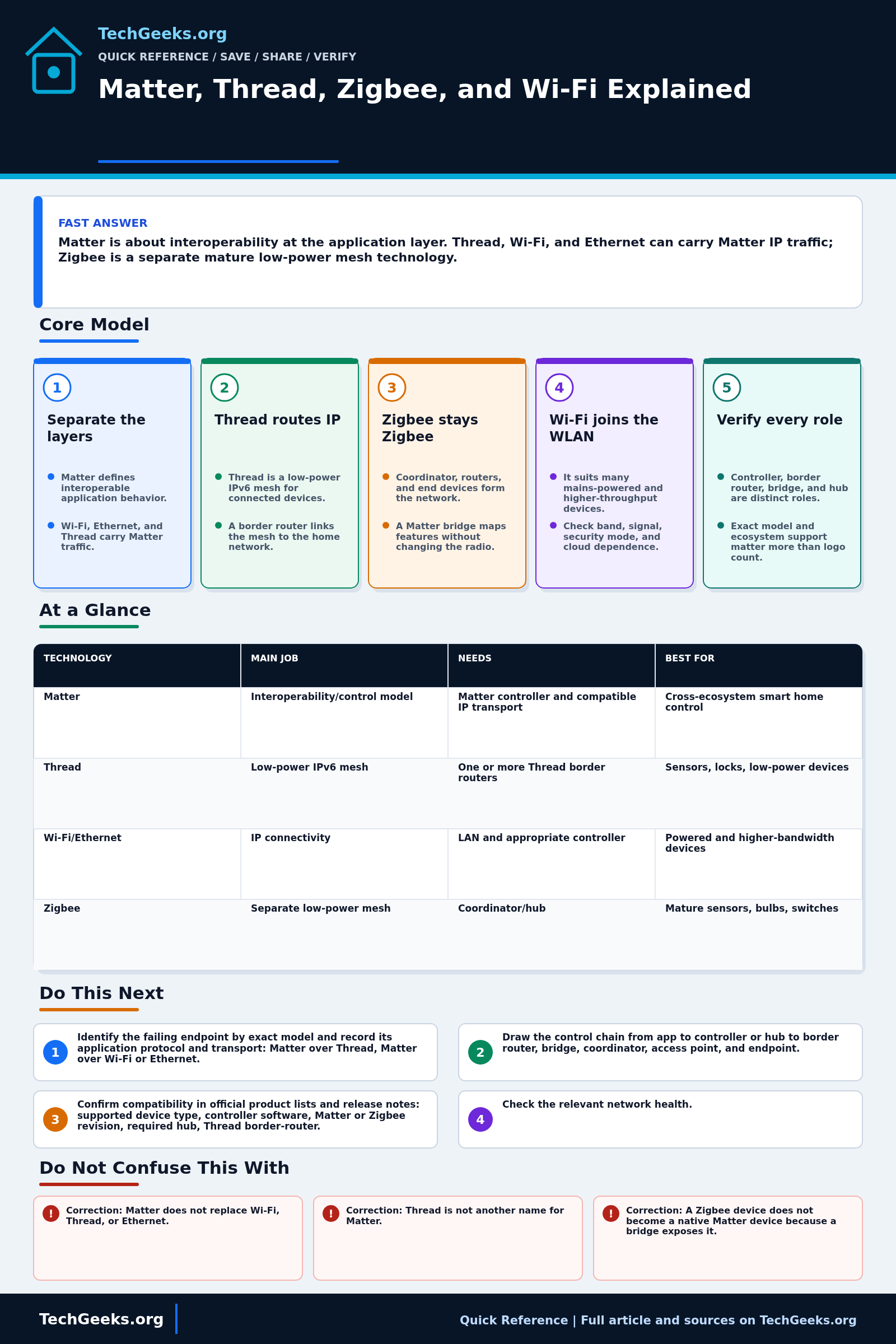
Matter defines smart-home control over IP; Thread, Wi-Fi, or Ethernet carries that traffic. Thread is a low-power IPv6 mesh with a border-router role, while Zigbee is a separate mesh with a coordinator or hub. Check the exact device's transport, controller, supported functions, and update path before buying. A Matter logo does not guarantee every feature works offline or identically in every ecosystem.
Start Here: The Beginner Foundation
Matter, Thread, Zigbee, and Wi-Fi do not all perform the same job. Matter is an IP-based application protocol and data model that defines how supported smart-home products identify capabilities, exchange commands, and work across compatible ecosystems. Matter operational traffic can use Wi-Fi, Ethernet, or Thread. Bluetooth Low Energy is commonly used to help commission a new device (add it to a controller), and newer Matter implementations can support NFC commissioning, but those setup bearers are not the everyday network transport. A Matter logo therefore says something about the application protocol and certification; it does not, by itself, tell you whether the product joins by Wi-Fi, Thread, or Ethernet.
Thread is a low-power IPv6 mesh network based on IEEE 802.15.4. A Thread border router routes IP packets between the Thread mesh and the rest of the home network; it does not need to translate the Matter application protocol. Zigbee also commonly uses low-power IEEE 802.15.4 radios and mesh routing, but it has its own network and application stack. A conventional Zigbee network has a coordinator and trust-center function, with routers extending the mesh and end devices often sleeping to save power. Wi-Fi connects IP devices through a wireless access point and is often suitable for mains-powered or higher-throughput products, though actual power use and band support depend on the device.
The required boxes are roles, and several roles may live in one product. A Matter controller commissions and controls Matter devices. A Matter-over-Thread device also needs access to a Thread border router. A Zigbee deployment usually needs a coordinator or hub, while a Matter bridge can represent supported Zigbee devices to a Matter ecosystem without changing those devices into native Matter radios. Matter multi-admin can place a device under more than one authorized ecosystem, but each ecosystem may expose a different subset of optional features. Before buying, verify the exact model, transport, device type, controller support, border-router or coordinator requirement, local behavior, vendor-only features, and firmware policy.
The Fast Comparison
| Technology | Main job | Needs | Best for |
|---|---|---|---|
| Matter | Interoperability/control model | Matter controller and compatible IP transport | Cross-ecosystem smart home control |
| Thread | Low-power IPv6 mesh | One or more Thread border routers | Sensors, locks, low-power devices |
| Wi-Fi/Ethernet | IP connectivity | LAN and appropriate controller | Powered and higher-bandwidth devices |
| Zigbee | Separate low-power mesh | Coordinator/hub | Mature sensors, bulbs, switches |
Advanced Notes and Design Boundaries
The logos describe layers and certified capabilities, not one interchangeable radio system. A dependable purchase plan names the endpoint's application protocol and transport, the controller or coordinator owner, Thread credentials where applicable, bridge behavior, ecosystem feature exposure, update responsibility, and offline failure path.
- Thread and Zigbee can share the IEEE 802.15.4 physical and link layers, especially in the 2.4 GHz band, but Thread carries IPv6 through 6LoWPAN, an adaptation for low-power radio links, while Zigbee uses its own network and application layers. Radio similarity does not create native interoperability.
- A Thread border router performs IP routing and service functions between links; a Matter controller manages a Matter fabric and device interactions. The roles are logically separate even when a smart speaker, hub, or gateway implements both.
- A Matter fabric is an authorized network of devices and controllers. Multi-admin lets a device participate in more than one fabric; Matter 1.6's Joint Fabric lets authorized controllers co-administer one shared fabric. Ecosystem and product adoption can lag the specification, so support must be verified rather than inferred from the version announcement.
- A Matter bridge maps supported non-Matter endpoints, such as Zigbee devices, into a Matter data model. Bridge quality, exposed clusters, firmware, and controller behavior determine which capabilities appear; the underlying Zigbee nodes remain on their Zigbee network.
- Multiple Thread border routers can improve path redundancy when they participate correctly in the same operational network. The practical failure mode is often fragmented Thread credentials or independently formed meshes across ecosystems, not simply having more than one border router.
Troubleshooting Workflow
Preserve commissioning codes, controller ownership, fabric membership, and current network credentials before resetting anything. A factory reset removes evidence and may strand automations, so isolate the failing layer and change only the endpoint, controller, border-router, coordinator, or IP path under test.
- Identify the failing endpoint by exact model and record its application protocol and transport: Matter over Thread, Matter over Wi-Fi or Ethernet, native Zigbee, or a vendor-specific Wi-Fi device. Also record the controlling app and integration path.
- Draw the control chain from app to controller or hub to border router, bridge, coordinator, access point, and endpoint. Mark which product owns each role and whether local control or a vendor cloud is involved.
- Confirm compatibility in official product lists and release notes: supported device type, controller software, Matter or Zigbee revision, required hub, Thread border-router capability, Wi-Fi band and security mode, and any vendor firmware prerequisite.
- Check the relevant network health. For Wi-Fi, verify association, address assignment, signal, and client isolation. For Thread or Zigbee, verify coordinator or border-router availability, mesh neighbors, powered routers, channel placement, and endpoint battery state.
- Test one layer at a time: vendor app if applicable, local ecosystem control, bridge or coordinator view, and finally the automation. Recommission or factory-reset only after saving codes and documenting the current fabric or network because reset can destroy useful evidence and require rebuilding access.
- After restoring control, test with the internet disconnected if local operation matters, then test remote access separately. Document the working transport, controller, fabric or network, firmware versions, setup code location, and which features require the vendor app or cloud.
Evidence and Acceptance Checks
The layer model and current-version notes are documentation-backed by the Connectivity Standards Alliance and Thread Group. Independent reporting on Matter 1.6 and an experimental Zigbee-versus-Matter-over-Thread paper provide limited corroboration. TechGeeks did not commission, bridge, packet-capture, range-test, power-measure, or fail over any Matter, Thread, Zigbee, or Wi-Fi product for this article.
- Purchase acceptance: the exact certified model and firmware support the required device type, transport, ecosystem, controller, border router or coordinator, and every must-have capability.
- Commissioning acceptance: setup completes from a documented owner account, recovery codes are protected, the endpoint appears in the intended fabric or network, and multi-admin exposure is verified separately in each ecosystem.
- Operational acceptance: local control, automation, update, reboot recovery, and battery or mesh behavior pass for the intended room; internet-disconnected behavior is tested only when local resilience is a requirement.
- Failure acceptance: loss of a cloud, controller, border router, coordinator, or AP produces a known outcome and a safe manual path for locks, climate, lighting, or other consequential devices.
Security, Privacy, Safety, and Recovery Boundaries
Certification and encrypted transport do not make an endpoint trustworthy forever. Maintain controller and device updates, protect setup codes and household accounts, remove former administrators, and segment IP devices where appropriate. Vendor clouds, telemetry, voice platforms, presence sensors, locks, and cameras can create privacy or legal obligations; review account sharing, retention, household consent, tenancy, and workplace monitoring before deployment. Safety-critical loads still need device-level limits and manual control.
Before moving ecosystems or replacing a controller, inventory fabrics, hubs, bridges, automations, scenes, setup codes, and factory-reset procedures. Back up controller platforms where supported and migrate a disposable device first. Rollback may mean recommissioning to the previous controller or restoring a hub backup; a reset Zigbee or Matter endpoint cannot be assumed to rejoin automatically with its former identity.
What This Does Not Mean
- Correction: Matter does not replace Wi-Fi, Thread, or Ethernet. It runs above those IP transports and defines interoperable device behavior for supported capabilities.
- Correction: Thread is not another name for Matter. Thread can carry other application protocols, and Matter can operate without Thread over Wi-Fi or Ethernet.
- Correction: A Zigbee device does not become a native Matter device because a bridge exposes it. The bridge maps selected capabilities while the endpoint remains on Zigbee.
- Correction: Matter does not guarantee that every feature is local, cloud-free, or identical in every ecosystem. Remote access, vendor extras, optional clusters, and controller support vary.
A published specification does not prove that controllers have shipped its features, that a certified device exposes every optional capability, or that several Thread border routers share one operational network. One experimental testbed cannot establish universal range, latency, energy use, or reliability across homes. Logos and release announcements must be paired with exact-model certification records, firmware notes, and deployment tests.
Real-World Use Cases
- Choose devices by real integration support, not logo count.
- Plan where border routers or coordinators live.
- Keep mains-powered mesh routers placed well.
- Test one room before migrating the whole home.
Failure Patterns to Recognize
- Matter device support differs by device class and ecosystem.
- Thread border routers do not share one operational credential set, creating fragmented Thread networks instead of useful redundancy.
- Weak Zigbee mesh from too few powered routers.
- Wi-Fi IoT devices overload 2.4 GHz or depend on cloud.
Common Mistakes
- Assuming Matter means local-only.
- Buying Thread devices without a border router.
- Mixing many ecosystems without documenting controllers.
- Ignoring firmware and app support.
Quick Checklist
- Pick ecosystem/controller.
- Check exact device support.
- Plan mesh/border router coverage.
- Test local behavior with internet disconnected.
- Document device network type.
Common Questions
Useful Gear And Buyer Notes
Affiliate disclosure: As an Amazon Associate, TechGeeks may earn from qualifying purchases. The product links below are buying references, not a requirement to buy a specific brand or seller. Verify compatibility, seller quality, warranty, and current specs before ordering.
Search by role only after the ecosystem plan is written. A Matter plug may use Wi-Fi rather than Thread, a product advertised as a Thread border router may expose that role only in one ecosystem, and a Zigbee coordinator may require specific firmware or host software; verify the exact certification and support matrix.
- Amazon search: Matter smart plug
- Amazon search: Thread border router
- Amazon search: Zigbee coordinator Home Assistant
Related TechGeeks Reading
- Matter in 2026: Buy, Wait, or Bridge? applies this layer model to a purchase decision.
- Zigbee vs Thread for Home Assistant compares the two low-power mesh paths in a specific controller context.
- A Local-First Smart Home Without Becoming a Sysadmin adds controller ownership and fallback planning.
A Specification Is Not a Product Support List
CSA's Matter 1.6 release describes NFC commissioning and Joint Fabric, but controllers and devices adopt features on their own schedules. Check the exact model, firmware, certification, transport, and ecosystem support. A Zigbee bridge exposes selected capabilities; it does not turn the underlying endpoint into a native Matter device.
References
- Connectivity Standards Alliance: Matter
- Connectivity Standards Alliance: Matter 1.6 Release
- Thread Group: Thread 1.4 Features
- Thread Group: Thread in Homes
- Connectivity Standards Alliance: Zigbee
- Connectivity Standards Alliance: Zigbee 4.0 and Suzi announcement
- Privacy Guides: Independent Matter 1.6 summary
- Independent experimental comparison of Zigbee and Matter over Thread