Router vs Switch vs Access Point: What Each Box Actually Does
 Tech Guru
Quick Answer
Add a switch for more Ethernet ports, an access point for a radio-coverage need, or a router upgrade when routing, firewall, VPN, or WAN capacity is the constraint. One appliance can perform several roles. Before changing it, ensure administrative access and record WAN, DHCP, VLAN, SSID, and cabling settings. Identify the failing path first; a new box does not fix every layer.
Start Here: The Beginner Foundation
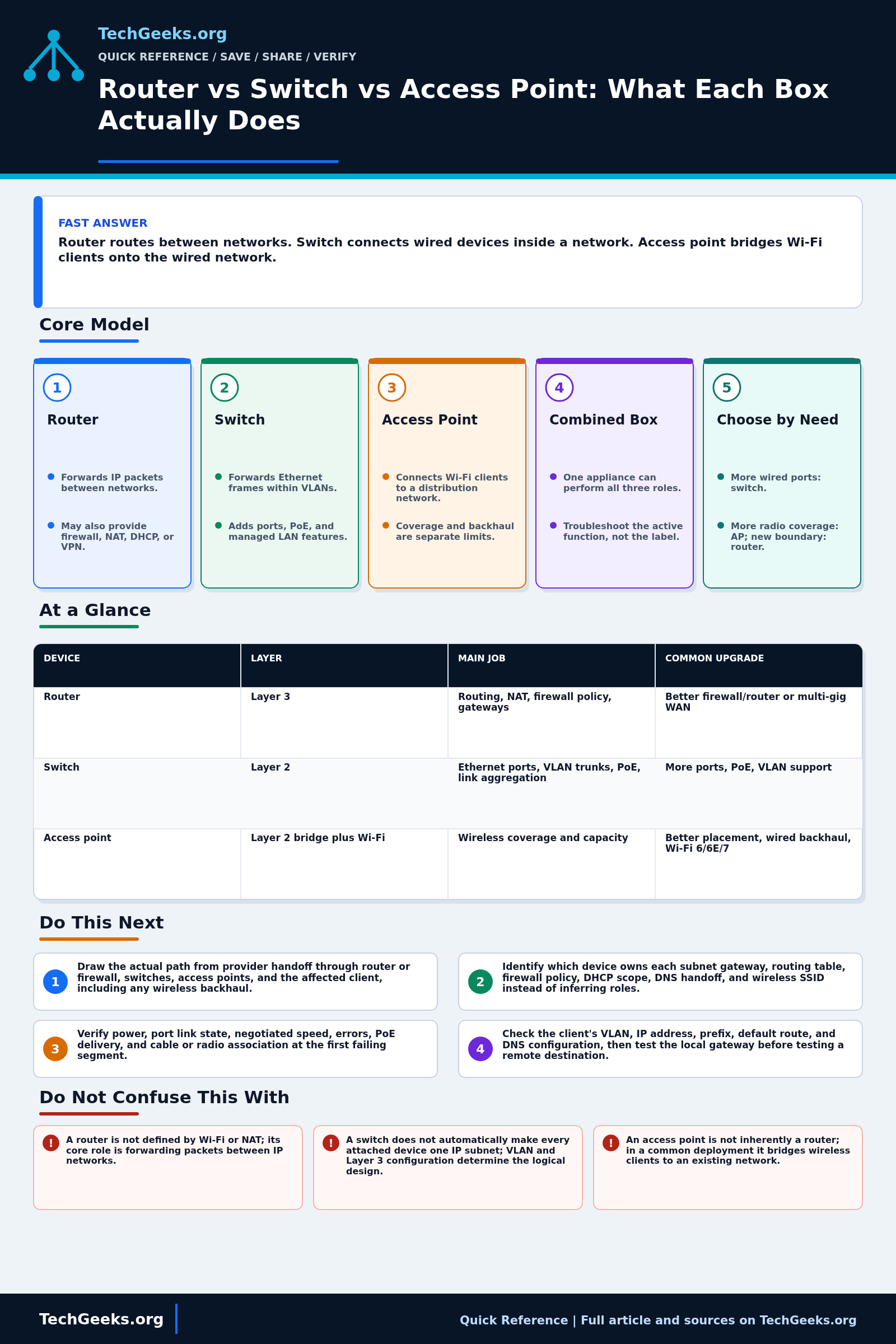
A router forwards IP packets between different networks. It examines a destination address, consults a forwarding table, and chooses a next hop or outgoing interface. A home router commonly adds a stateful firewall, NAT for IPv4, DHCP, DNS forwarding, VPN features, Ethernet ports, and Wi-Fi, but those are bundled services rather than the definition of routing. A Layer 3 switch, firewall, server, or virtual appliance can also route when configured to forward between IP networks.
An Ethernet switch connects devices within bridged networks and usually forwards frames according to learned destination MAC addresses and VLAN membership. It gives each link its own collision domain, while a VLAN defines the relevant Layer 2 broadcast domain. Managed switches may add VLANs, link aggregation, spanning tree, access control, monitoring, Power over Ethernet, and even Layer 3 routing. An unmanaged switch is appropriate only when those controls are not required and every attached device should share the same simple LAN.
A wireless access point provides an IEEE 802.11 radio attachment to a distribution network, commonly bridging Wi-Fi clients into one or more wired VLANs. Coverage, capacity, interference, channel plan, client capability, and backhaul all influence wireless results. Adding an access point can improve a radio problem without replacing the router, and adding a switch can provide ports without creating a new IP boundary. Consumer boxes hide these roles together, so troubleshooting should identify the active role and traffic path rather than rely on the product label.
The Fast Comparison
| Device | Layer | Main job | Common upgrade |
|---|---|---|---|
| Router | Layer 3 | Routing, NAT, firewall policy, gateways | Better firewall/router or multi-gig WAN |
| Switch | Layer 2 | Ethernet ports, VLAN trunks, PoE, link aggregation | More ports, PoE, VLAN support |
| Access point | Layer 2 bridge plus Wi-Fi | Wireless coverage and capacity | Better placement, wired backhaul, Wi-Fi 6/6E/7 |
Advanced Notes and Design Boundaries
Classify each box by the function it performs in the traffic path, not by its retail name. A single chassis may route, switch, filter, translate, serve DHCP, and provide radios, while a managed switch may also route; ownership of each gateway, policy, address pool, VLAN, and SSID should be recorded against the device actually providing it.
- A router's defining data-plane action is IP forwarding based on destination prefixes; NAT, stateful inspection, DHCP, and wireless service are independent features that may be absent.
- A bridge or switch learns source MAC addresses per forwarding domain and uses destination MAC plus VLAN context to forward, filter, or flood frames; unknown unicast and relevant broadcast traffic can be flooded within that domain.
- A multilayer switch can perform both 802.1Q bridging and IP routing through routed ports or switched virtual interfaces, so the physical chassis does not determine the network layer in use.
- An AP can map different SSIDs or authentication roles to different VLANs, making its wired uplink a tagged multi-VLAN link when the design requires more than one client network.
- Wireless backhaul consumes radio airtime and may change capacity and failure behavior; wired Ethernet backhaul is often preferable when cabling, switch capacity, and power arrangements permit it.
Troubleshooting Workflow
Troubleshoot from the client outward and map each symptom to a layer: power and link, VLAN and association, address configuration, gateway reachability, route and firewall state, DNS, then the application. Save configurations before changing a combined device because one reset can alter several roles at once.
- Draw the actual path from provider handoff through router or firewall, switches, access points, and the affected client, including any wireless backhaul.
- Identify which device owns each subnet gateway, routing table, firewall policy, DHCP scope, DNS handoff, and wireless SSID instead of inferring roles from branding.
- Verify power, port link state, negotiated speed, errors, PoE delivery, and cable or radio association at the first failing segment.
- Check the client's VLAN, IP address, prefix, default route, and DNS configuration, then test the local gateway before testing a remote destination.
- For wired faults, inspect MAC learning and VLAN membership; for wireless faults, inspect signal, channel use, retries, client association, and AP uplink health.
- For off-subnet faults, inspect route selection, return routes, firewall logs, and translation state, then compare a known-good client on the same access network.
Evidence and Network Acceptance Tests
The role descriptions here are documentation-backed; TechGeeks did not build and instrument a representative router-switch-AP topology for this review. Validate the actual design from both wired and wireless clients, keeping interface state, address leases, route tables, and policy logs as evidence.
- Confirm that each test client receives an address, prefix, gateway, and DNS settings from the intended DHCP service, and that there is no unexpected second server or NAT boundary.
- On the switch, verify the client MAC appears on the expected access VLAN and that every AP or inter-switch trunk carries only the intended tagged and untagged VLANs.
- Test the local gateway by IP, an allowed destination on another subnet, a deliberately denied destination, an internet IP, and then a DNS name. Match each result to firewall or route evidence.
- Repeat the allowed and denied tests over Wi-Fi, confirm the expected SSID-to-VLAN mapping, and inspect association, retry, channel-use, and uplink data rather than relying only on signal bars.
- Measure throughput separately across the LAN, through the edge router or firewall, and to the provider. A slow internet test alone cannot locate the bottleneck.
- Export current configurations and record cable ports before replacement. The rollback passes only when the former gateway, addressing, wired access, and wireless service can be restored without factory-reset guesswork.
Security, Privacy, and Rollback Boundaries
- Change default credentials, use supported firmware, restrict management access to trusted networks, and disable remote administration or cloud control that is not required.
- Guest or untrusted device isolation depends on firewall policy and correct VLAN mapping across the router, switch, and AP. An SSID name or switch port label is not enforcement.
- Configuration exports, packet captures, client lists, and cloud dashboards can expose public addresses, device identities, browsing destinations, and credentials. Limit collection, redact shared evidence, and follow workplace or local privacy requirements.
- Use permitted radio channels and power for the deployment country. Regulatory domain, indoor-only spectrum, and automated frequency controls can change what an AP may use.
- Keep a local recovery path, known-good firmware, and the old working device until acceptance passes. Avoid remote-only changes to the sole management path unless an out-of-band recovery method exists.
What This Does Not Mean
- A link light proves electrical or optical link at one segment; it does not prove correct VLAN membership, addressing, routing, DNS, or application reachability.
- A successful ping through a Layer 3 switch does not prove it can replace an edge router's NAT, stateful firewall, VPN, WAN, or logging functions.
- Strong Wi-Fi bars do not prove low interference, adequate airtime, healthy backhaul, or fast internet service.
- A switch does not automatically place every port in one IP subnet, and an access point is not automatically a router; configuration determines those boundaries.
- One client's successful test does not prove capacity, roaming, policy, or compatibility for all devices and locations.
Real-World Use Cases
- Use a switch when you only need more Ethernet ports.
- Use additional access points when coverage is the problem.
- Upgrade the router when firewall throughput, VLANs, VPN, or WAN speed is the limit.
- Use wired backhaul for APs whenever possible.
Failure Patterns to Recognize
- Double NAT from stacking routers.
- Slow Wi-Fi because the AP is hidden in a cabinet.
- No VLAN support on an unmanaged switch where segmentation is required.
- PoE devices rebooting because the switch power budget is too small.
Common Mistakes
- Buying a mesh kit when one wired access point would fix coverage.
- Using a router as an access point without disabling routing/DHCP.
- Replacing a combined gateway without accounting for its routing, firewall, DHCP, and Wi-Fi roles.
- Assuming more antennas means better placement.
Quick Checklist
- Draw the path from modem/ONT to router to switch to APs.
- Identify which device runs DHCP.
- Identify which device provides Wi-Fi.
- Check whether each AP has wired or wireless backhaul.
- Confirm that clients use the intended gateway configuration for their subnet and address family.
Common Questions
Useful Gear And Buyer Notes
Affiliate disclosure: As an Amazon Associate, TechGeeks may earn from qualifying purchases. The product links below are buying references, not a requirement to buy a specific brand or seller. Verify compatibility, seller quality, warranty, and current specs before ordering.
Buy for the missing role: port count, VLAN and management features, PoE budget, uplink rate, firewall or VPN throughput, radio bands, placement, and support lifetime. A combined gateway can simplify a small network; separate components make sense when their capacity, location, lifecycle, or policy requirements differ.
- Amazon search: WiFi access point PoE
- Amazon search: unmanaged gigabit switch
- Amazon search: VLAN managed switch
Related TechGeeks Reading
- OPNsense, pfSense, UniFi, or a Consumer Router?
- Mesh Isn't Always the Answer
- Networking Field Notes: Start Here
References
- Cisco: What is a network switch?
- Cisco: What is a router?
- RFC Editor: RFC 1812, Requirements for IP Version 4 Routers
- IEEE SA: IEEE 802.1Q-2022, Bridges and Bridged Networks
- IEEE SA: IEEE 802.11-2024 Wireless LAN Standard
- Cisco: What Is a Wireless Access Point?
- Cloudflare Learning Center: What is a router?
- Cloudflare Learning Center: What is a network switch?