RAID vs Backup: What Each One Protects
 Tech Guru
Quick Answer
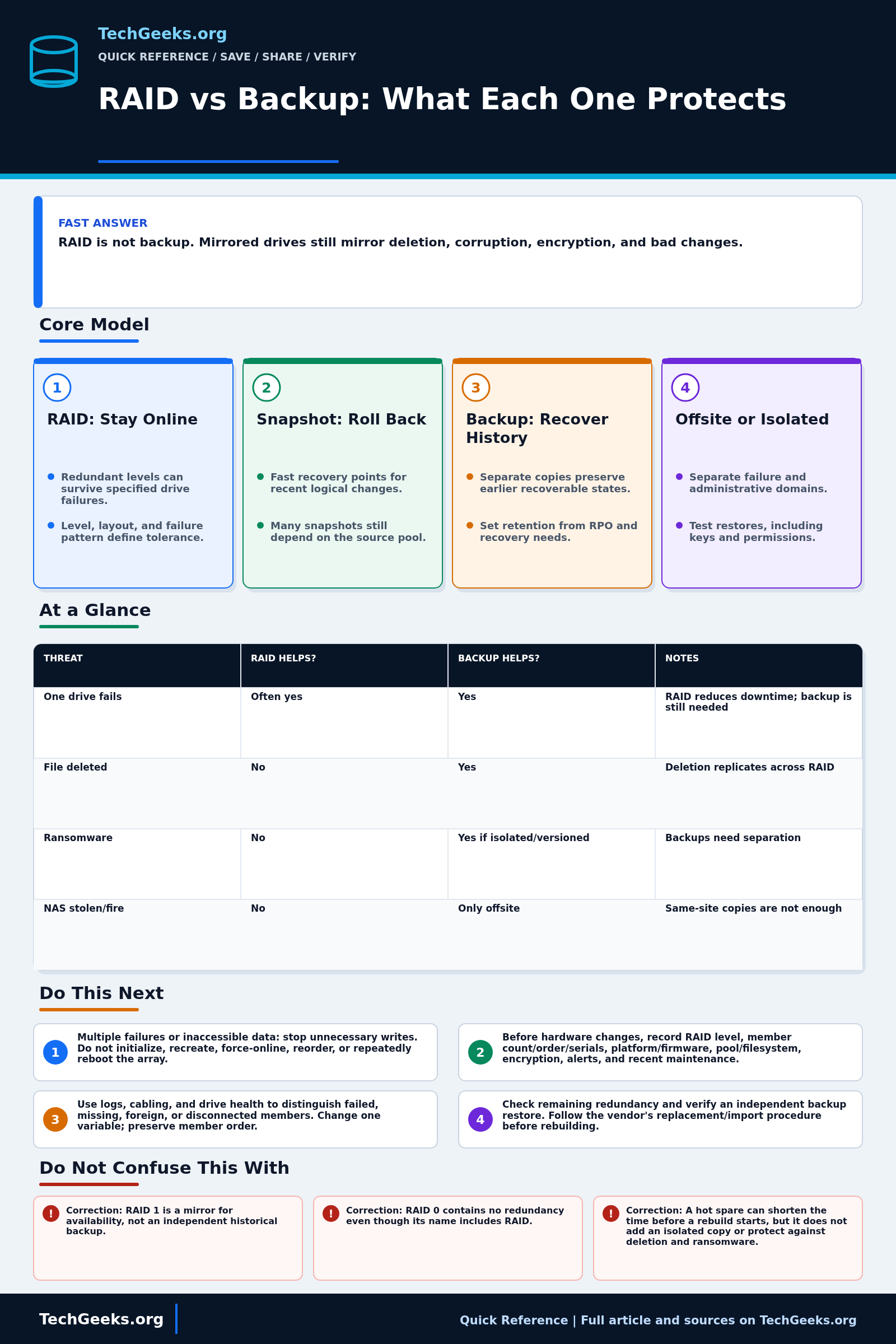
Redundant RAID levels can keep storage available after specific member-drive failures; they do not preserve an earlier copy after deletion, corruption, or ransomware. Use snapshots for supported local rollback and independent backups for recoverable history, with an offsite or isolated copy for larger failures. RAID 0 has no redundancy. Do not practice failures or rebuilds on the only copy of valuable data.
Before acting on an array, identify its RAID level, platform model, encryption state, and backup destinations. If member order, controller metadata, or multiple failures are uncertain, preserve the set and seek vendor or specialist recovery help.
Start Here: The Beginner Foundation
RAID combines multiple drives into one logical storage set to pursue availability, performance, capacity, or a mix of those goals. The result depends on the RAID level. RAID 0 stripes data but has no redundancy; RAID 1 mirrors data; RAID 5 and RAID 6 distribute parity; and RAID 10 combines striping with mirrors. A redundant level can keep a system operating after supported member-drive failures, but it is already in a degraded and higher-risk state until the failed member is replaced and the array is successfully rebuilt.
A RAID controller or filesystem writes ordinary changes across the array. If a user deletes a folder, malware encrypts mounted files, an application corrupts a database, or an administrator formats the wrong volume, RAID normally preserves that changed state just as faithfully as the desired state. It also shares the enclosure, controller, power, cooling, firmware, and often the administrator account with the live data. RAID therefore addresses a narrower failure domain than a backup and should be justified by uptime or performance needs, not treated as recovery history.
A backup is a recoverable copy stored on another storage target, usually with earlier versions or recovery points. Separation matters: an offsite, offline, access-isolated, or immutable copy can survive events that affect the production array. Local snapshots are useful for fast rollback, but many depend on the source storage and can disappear with that system. A resilient design can use RAID for service continuity, snapshots for quick local recovery, backups for history, and an offsite or isolated copy for major incidents.
The Fast Comparison
| Threat | RAID helps? | Backup helps? | Notes |
|---|---|---|---|
| One drive fails | Often yes | Yes | RAID reduces downtime; backup is still needed |
| File deleted | No | Yes | Deletion replicates across RAID |
| Ransomware | No | Yes if isolated/versioned | Backups need separation |
| NAS stolen/fire | No | Only offsite | Same-site copies are not enough |
Advanced Notes and Design Boundaries
Storage protection should be designed from a recovery point objective (RPO, acceptable recent data loss) and recovery time objective (RTO, acceptable restore duration), then mapped to copies that do not depend on the same hardware, site, or destructive credentials. Array redundancy, snapshots, replication, backup retention, isolated credentials, and offsite copies answer different parts of that design; none should inherit a broader claim merely because a dashboard is green.
- Fault tolerance is level- and layout-specific. RAID 5 commonly tolerates one member failure, RAID 6 commonly tolerates two, and RAID 10 survival depends on which members fail; RAID 0, spanning, and JBOD should not be described as redundant.
- A rebuild is a recovery operation, not proof of data integrity. It reads surviving members heavily, can expose latent errors, and leaves less or no redundancy until completion; workload, capacity, media health, controller behavior, and rebuild priority affect the risk window.
- RAID does not independently cover enclosure, controller, firmware, filesystem, power, theft, site disaster, credential compromise, or operator error. Dual controllers, checksummed filesystems, UPS protection, and scrubbing address parts of that list but still do not create recovery history.
- Storage-efficient snapshots often reference unchanged blocks in the source. If the source pool or snapshot metadata is lost, those snapshots may be unusable; replication to a separately administered target can improve independence but must preserve retention and access isolation.
- Design backup around application-consistent recovery points, retention, RPO, and RTO. A successful job log is insufficient evidence: restore data, metadata, permissions, encryption keys, catalogs, and dependent services to an alternate location and verify the result.
Troubleshooting Workflow
When an array degrades, preservation comes before experimentation. Minimize writes, record member order and controller state, and prove that an independent restore works before authorizing any rebuild, import, or metadata-changing command that could reduce recovery options.
- When an array reports multiple failures or data becomes inaccessible, stop unnecessary writes and do not initialize, recreate, force-online, reorder, or repeatedly reboot the set; those actions can destroy recoverable metadata.
- Capture the array level, member count and order, exact drive serial numbers, controller or NAS model, firmware, pool and filesystem layout, encryption details, current status, alerts, and recent maintenance before changing hardware.
- Distinguish failed, missing, foreign, and merely disconnected members using controller logs, cabling checks, enclosure events, and drive health data. Change one variable at a time and preserve the original member order.
- Calculate the remaining redundancy for the exact level and failure pattern, verify that an independent backup can be restored, and follow the platform vendor's documented replacement or import procedure before starting a rebuild.
- If the array is degraded but readable, protect newly changed critical data to a separate target when doing so will not worsen the failure. Restore a representative backup to an alternate location before relying on it for a risky repair.
- Replace only the confirmed failed component, monitor the entire rebuild, then run the platform's integrity check or scrub where supported. Verify applications and files, refresh the backup, test another restore, and document the cause and recovery time.
Evidence and Restore Acceptance Tests
This review is documentation-backed; no array was deliberately degraded, rebuilt, encrypted by ransomware, or restored in a TechGeeks lab. For your system, evidence means a dated restore record, not only a successful backup job or RAID health screen.
- Write an RPO and RTO for each important dataset, then confirm that schedule, retention, transfer time, and restore time can meet them.
- Restore a randomly selected current file and an older or deleted version to an alternate path; verify content, timestamps, permissions, and ownership rather than opening only one document.
- Restore one application or service with its configuration, database-consistent recovery point, keys, and dependencies. Start it without using the production storage and record the elapsed time.
- Demonstrate that an offsite, offline, immutable, or separately administered copy remains reachable when production storage credentials are disabled or the NAS is unavailable.
- Test recovery of encryption keys, backup catalogs, multifactor methods, and account-recovery material without exposing them in the runbook.
- Monitor array scrubs and rebuilds as availability tests, but score them separately from backup restoration. Keep the last known-good recovery point until post-repair verification is complete.
Security, Retention, and Recovery Boundaries
- Use backup credentials that ordinary users and a compromised production administrator cannot silently reuse. Protect deletion, retention, and immutability controls with stronger authorization where the platform supports it.
- Encrypt sensitive backups in transit and at rest, but store tested recovery material separately. Encryption without recoverable keys converts a hardware incident into permanent data loss.
- Retention can be constrained by contracts, litigation holds, privacy obligations, and data-minimization rules. Confirm the applicable policy instead of keeping every personal or regulated record indefinitely.
- Do not practice destructive member removal, force assembly, or ransomware response on the sole production set. Use sacrificial media or a representative lab, and obtain vendor or specialist help when member order, controller metadata, or multiple failures are uncertain.
- After a suspected compromise, isolate affected systems and preserve logs before restoring. A clean restore destination and known-good credentials matter as much as the backup copy.
What This Does Not Mean
- A healthy RAID status does not prove files, filesystem metadata, or application data are correct; the array can faithfully preserve corruption.
- A completed rebuild proves that reconstruction finished under that controller's rules. It does not prove that every file is readable or that another failure can be survived.
- One successful file restore does not prove application-consistent recovery, acceptable RTO, account recovery, or the survival of an entire site failure.
- An immutable recovery point can resist later deletion while still containing malware, stolen credentials, or a bad configuration captured before the incident.
- RAID 0 has no redundancy, and a hot spare adds neither history nor isolation; their names and presence do not change the backup requirement.
Real-World Use Cases
- Use RAID for uptime when storage must stay online.
- Use snapshots for quick local rollback.
- Use backups for recovery history.
- Use offsite copies for site-level disasters.
Failure Patterns to Recognize
- A rebuild fails after another drive errors.
- Ransomware encrypts mounted shares.
- Cloud sync deletes files everywhere.
- Backup job ran but restore was never tested.
Common Mistakes
- Calling RAID 1 a backup.
- Keeping backup disks permanently mounted and writable.
- Never testing restore.
- Relying on one NAS for both live data and only backup.
Quick Checklist
- List top failure scenarios.
- Identify separate backup target.
- Add versioning/immutability where possible.
- Schedule restore tests for the data's importance and retest after major storage or backup changes.
- Keep at least one offsite copy.
Common Questions
Useful Gear And Buyer Notes
Affiliate disclosure: As an Amazon Associate, TechGeeks may earn from qualifying purchases. The product links below are buying references, not a requirement to buy a specific brand or seller. Verify compatibility, seller quality, warranty, and current specs before ordering.
Choose drives from the NAS or controller compatibility list and match interface, sector format, recording technology, endurance, vibration rating, and workload to the intended array. Capacity-matched media, spare drives, and a UPS can improve serviceability, but the backup target still needs its own failure and access boundaries.
- Amazon search: external hard drive backup
- Amazon search: NAS 4 bay diskless
- Amazon search: UPS for NAS
Related TechGeeks Reading
- RAID, ZFS, Snapshots, Sync, and Backup: What Each Layer Protects
- Homelab Backup Strategy: Restore Tests, NAS Copies, and Offsite Recovery
- The 3-2-1 Backup Rule in 2026