Patch Panel vs Switch: What Belongs in the Rack
 Tech Guru
Quick Answer
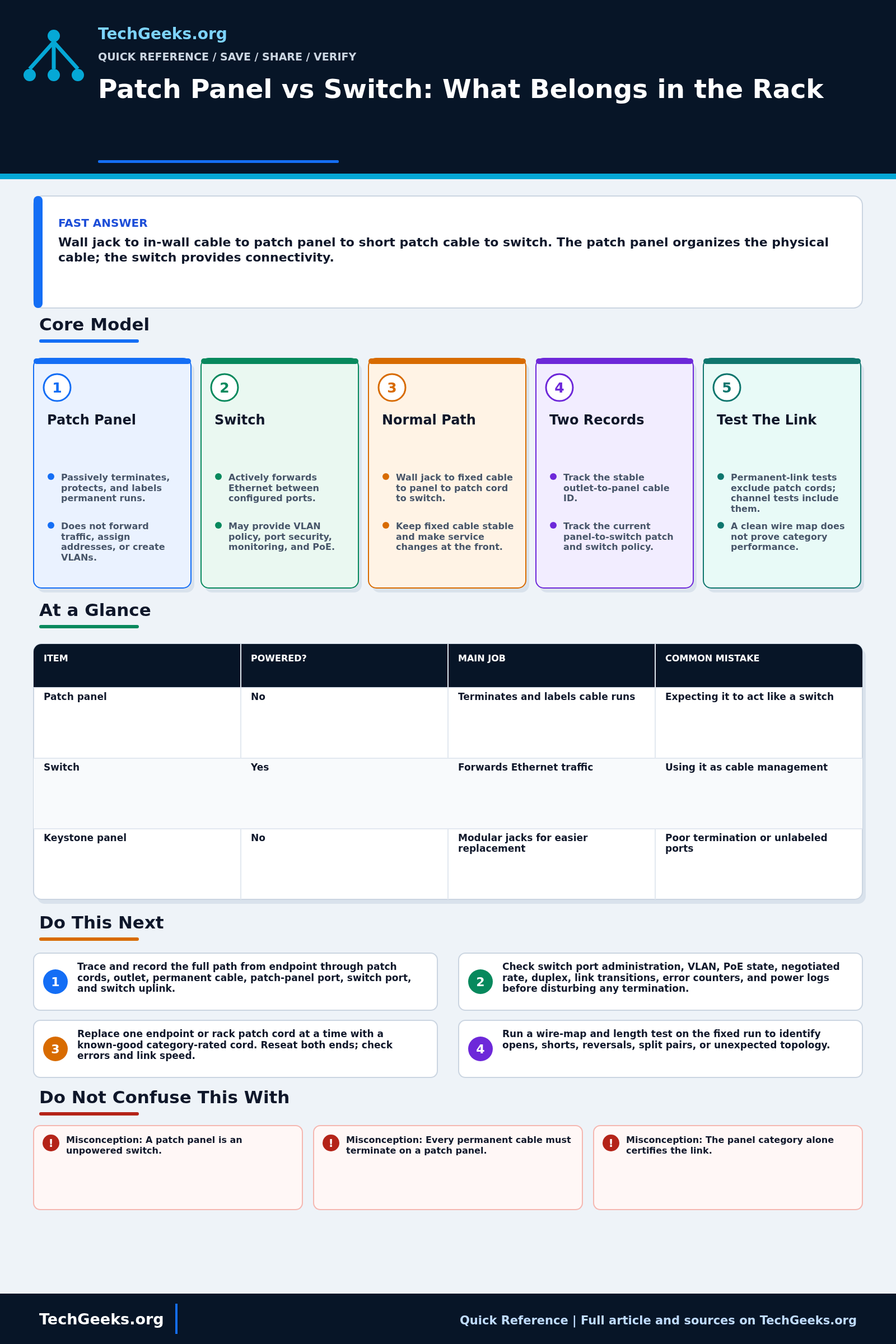
A patch panel terminates and labels permanent cable; a powered switch forwards Ethernet traffic and may supply PoE. The usual path is wall jack, in-wall cable, patch panel, short patch cord, then switch. Use the panel to keep fixed runs stable while switch assignments change. It does not create VLANs or improve speed, and the whole cable channel still needs the appropriate test.
Start Here: The Beginner Foundation
A patch panel is passive connecting hardware. Permanent cables from rooms or device locations terminate on the back, and labeled ports on the front provide a stable place to patch those runs. A switch is powered network equipment that learns Ethernet addresses and forwards frames between active ports; managed switches may also enforce VLAN, authentication, quality-of-service, and PoE settings. A panel cannot replace a switch, assign an IP address, or make an unused wall jack live.
The common structured-cabling path is device to work-area patch cord, wall jack to permanent horizontal cable, horizontal cable to patch-panel port, rack patch cord to switch port, and switch uplink to the rest of the network. This protects fixed cable from repeated handling and makes moves or switch replacement a front-of-rack change. A patch panel is not mandatory for every tiny installation, and defined direct-attach designs exist, but a panel becomes valuable when several permanent runs need orderly termination, testing, labeling, and future reassignment.
Performance is an end-to-end property. The panel, jacks, cable, termination workmanship, and patch cords must support the intended category and application. A passive panel should not reduce a healthy link's negotiated rate, but a split pair, excessive untwist, damaged insulation-displacement contact (IDC), poor coupler, incompatible conductor, or bad patch cord can cause errors or a fallback to 100 Mb/s. PoE also passes through the contacts, so resistance and connection quality matter even though the panel neither produces nor negotiates power.
The Fast Comparison
| Item | Powered? | Main job | Common mistake |
|---|---|---|---|
| Patch panel | No | Terminates and labels cable runs | Expecting it to act like a switch |
| Switch | Yes | Forwards Ethernet traffic | Using it as cable management |
| Keystone panel | No | Modular jacks for easier replacement | Poor termination or unlabeled ports |
Advanced Notes and Design Boundaries
A patch panel is passive structured-cabling termination; a switch is powered network equipment that forwards Ethernet frames and may supply PoE. The operational boundary matters: permanent cabling should stay stable, labeled, and testable while short patch cords map those outlets to switch ports whose VLAN, speed, PoE, and monitoring assignments can change.
- Use the correct test boundary. A permanent-link test covers the fixed cabling from the patch-panel connection through the work-area outlet, while a channel test adds the equipment cords and patch cords to that fixed cabling; the conventional limits are 90 m and 100 m respectively.
- Terminate to one documented T568A or T568B scheme at both ends and preserve each pair's twist close to the IDC. Either scheme can work when consistent; visual pin order is not a substitute for pair-aware wire mapping and certification.
- Treat shielded panels as part of a complete screened system with compatible cable, jacks, cords, bonding, and equipment practice. A metal panel alone does not convert unshielded cabling into a shielded channel.
- Maintain two mappings: the stable cable ID from room outlet to panel port, and the changeable patch from panel port to switch port and switch configuration. This separates physical-plant records from current network service.
- High-power PoE makes termination resistance and unbalance more consequential. Inspect and test all four pairs, use category-compatible contacts, and investigate heat, discoloration, intermittent power, or switch power events rather than bypassing a suspect panel indefinitely.
Troubleshooting Workflow
For a dead or slow outlet, preserve the port map and move outward from the active switch. Record switch link state, negotiated speed, VLAN and PoE counters, panel port, cable ID, outlet, and endpoint; substitute one known-good patch cord at a time before reopening a permanent termination.
- Trace and record the full path from endpoint through patch cords, outlet, permanent cable, patch-panel port, switch port, and switch uplink; confirm the labels match reality.
- Check switch port administration, VLAN, PoE state, negotiated rate, duplex, link transitions, error counters, and power logs before disturbing any termination.
- Replace the endpoint and rack patch cords one at a time with known-good category-rated cords, reseat both ends, and observe whether errors or link speed change.
- Run a wire-map and length test on the fixed run to identify opens, shorts, reversals, split pairs, or unexpected topology, then inspect both IDC terminations for pair twist and conductor seating.
- Certify the permanent link to its documented category; if PoE is involved, also evaluate resistance-related results and test under the endpoint's highest expected load.
- Repair or reterminate only the failed component, retest, then update the outlet-to-panel and panel-to-switch records plus the final certification report.
Evidence and Cabling Acceptance Test
This Quick Reference is documentation-backed. TechGeeks did not install or certify the reader's permanent links, test PoE heat, or validate a specific panel, jack, cable, patch cord, switch, and endpoint channel. A continuity light proves conductor connection only; category performance requires the appropriate field test and limits.
- Assign a durable cable ID and record panel port, work-area outlet, switch port, VLAN or role, and test date before patching.
- Wire-map all pairs and shield where applicable, then certify the permanent link to the intended category when the installation requires guaranteed performance.
- Add the actual patch cords and endpoint, confirm negotiated speed, inspect switch errors, and run a representative traffic test.
- For PoE, verify class, switch budget, endpoint draw, conductor/category suitability, temperature assumptions, and stable operation under load.
- Move the patch cord to a documented spare switch port and restore the original mapping; recovery passes only when labels and records still identify the path.
What Link Lights and Labels Do Not Prove
- A link light does not prove the permanent link meets its category, the channel is error-free, or the switch port carries the intended VLAN and PoE policy.
- Misconception: A patch panel is an unpowered switch. Correction: A panel is passive termination and cross-connect hardware; only active equipment forwards Ethernet frames.
- Misconception: Every permanent cable must terminate on a patch panel. Correction: Panels are the conventional maintainable design, but recognized direct-attach and small-installation alternatives exist when suitable components and test limits are used.
- Misconception: The panel category alone certifies the link. Correction: Every component, termination, and cable segment must meet the intended channel or permanent-link performance.
- Misconception: Moving a patch cord only changes the physical port. Correction: The destination switch port may carry a different VLAN, PoE policy, authentication rule, speed, or security profile, so records and configuration must move together.
PoE, Building, and Recovery Boundaries
Poor terminations, unsuitable cable, excessive bundles, damaged conductors, or unbalanced resistance can create data errors, voltage drop, heat, and endpoint resets. A passive patch panel does not negotiate or generate PoE, but every connector and conductor remains part of the powered channel. Do not energize uncertain cabling merely because continuity passes.
Permanent cabling can be subject to local electrical, firestop, pathway, plenum, grounding, accessibility, and low-voltage licensing requirements. Use qualified installers where required; this article is not code-compliance approval. Keep as-built records outside the rack, preserve spare ports and patch cords, and avoid renumbering fixed cabling when a switch assignment changes.
Real-World Use Cases
- Use patch panels when you have several permanent cable runs.
- Label room, jack, patch panel port, and switch port.
- Use short patch cords between panel and switch.
- Document port usage in maintained outlet, panel, and switch-port records.
Failure Patterns to Recognize
- A bad punch-down can cause errors, link failure, or fallback to 100 Mbps.
- Unlabeled cables make every move a trace exercise.
- PoE camera reboots due to poor termination.
- Patch cords hide a bad permanent link.
Common Mistakes
- Using direct permanent-cable-to-switch termination without suitable hardware, strain relief, labeling, and a documented maintenance reason.
- Leaving ports unlabeled.
- Using cable that is not listed for its concealed pathway.
- Forgetting strain relief and bend radius.
Quick Checklist
- Label both ends.
- Test each terminated run.
- Map patch panel ports to rooms.
- Keep spare patch cords.
- Photograph the rack after changes.
Common Questions
Cabling Standard and Hardware Recheck
Fact-checked July 15, 2026 against TIA's ANSI/TIA-568.2-E announcement, IEEE 802.3-2022, BICSI labeling guidance, and Fluke Networks' permanent-link and channel testing explanations. Standards access and amendments can change, and vendor field guidance does not replace the project specification or local code.
Related TechGeeks Reading
- 2.5GbE vs 10GbE: Which Home Network Upgrade Is Worth It?
- Homelab VLAN Design: Simple Network Segmentation That Works
- My Ubiquiti UniFi Home Network
Useful Gear And Buyer Notes
Affiliate disclosure: As an Amazon Associate, TechGeeks may earn from qualifying purchases. The product links below are buying references, not a requirement to buy a specific brand or seller. Verify compatibility, seller quality, warranty, and current specs before ordering.
Specify rack units, panel style, port count, category, shielding design, cable type, conductor gauge, termination system, labeling, switch depth, airflow, uplinks, PoE budget, and test requirement before ordering. A cheap continuity tester can find opens and reversals; it cannot certify the permanent link for the intended Ethernet category.
- Amazon search: 24 port patch panel Cat6
- Amazon search: network rack cable management
- Amazon search: punch down tool
References
- TIA: structured cabling standards
- TIA Announcement: ANSI/TIA-568.2-E Balanced Twisted-Pair Cabling
- Fluke Networks: Permanent Link and Channel Testing
- Fluke Networks: Cross-Connects and Interconnects
- BICSI Telecommunications Project Management Manual, Labeling and Records
- IEEE 802.3-2022 Ethernet Standard
The July 15, 2026 review supports the passive-versus-active boundary and test model, not certification or code approval for a particular installed link.