Home Assistant Entities, Devices, and Automations
 Tech Guru
Quick Answer
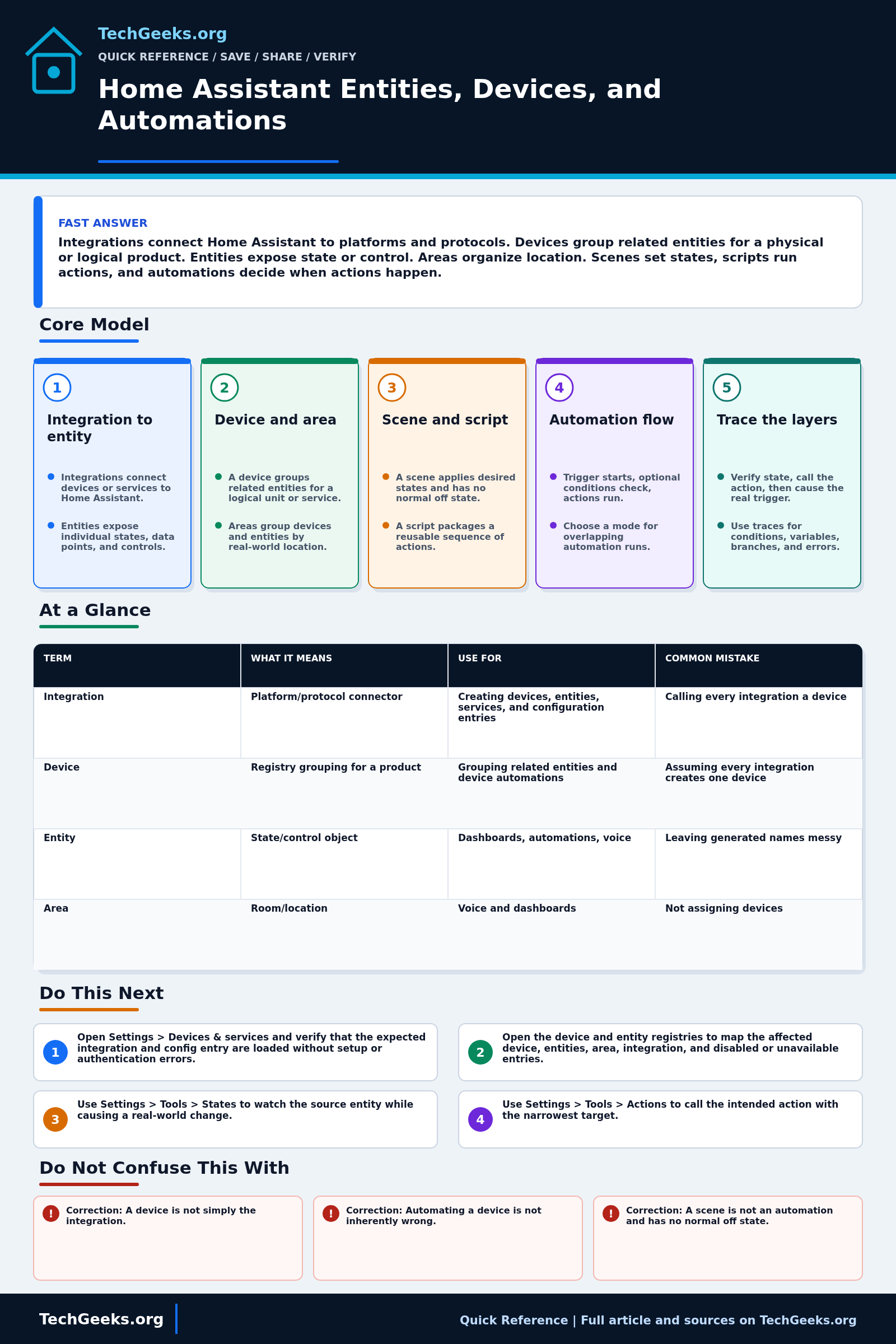
Start with the entity: it exposes the state or control that Home Assistant can use. An integration supplies entities and may group them under a device; an area adds location. Use a scene for desired states, a script for reusable actions, and an automation for a trigger, optional conditions, and actions. When behavior fails, prove the source entity changes, test the narrow action, cause the real trigger, and inspect its trace. Run actions is not an end-to-end test.
Start Here: The Beginner Foundation
Home Assistant integrations connect to devices or information services and expose their useful data and controls as entities. An entity is the basic state object: for example, a plug may provide switch power, energy, firmware-update, and signal-strength entities. Each entity has an entity ID such as switch.desk_lamp, a current state, and attributes that add context. A device is a registry model for a physical or logical unit, or for a service, and it can group one or more related entities. Some entities are not attached to a device, and some devices can exist without normal control entities, so the relationship is useful but not a strict one-device-one-entity rule.
Areas organize devices and entities around real places such as a kitchen or garage, and they can be targeted by actions. Use human-readable names and aliases for dashboards and voice, while treating the entity ID as a stable technical handle that deserves deliberate changes. Scenes, scripts, and automations model different kinds of behavior. A scene applies desired states to a group of entities and is stateless rather than an on/off switch. A script is a reusable sequence of actions and is itself exposed as an entity. An automation waits for one or more triggers, checks optional conditions against current state, and then runs its actions.
Troubleshooting becomes easier when each layer is tested separately. First confirm that the integration is loaded and the entity state changes under Settings > Tools > States. Then call the intended action directly against the entity, device, area, or other target. Next test the script or scene, and only then inspect the automation trigger and conditions. Home Assistant's Run actions command skips triggers and top-level conditions, but conditions inside the action sequence still run. It tests that sequence in the current context, not the whole automation. A trace records the executed path, values, condition results, and errors for real runs. Keep automations focused, select a concurrency mode intentionally, and create a recoverable backup before broad renaming or restructuring.
The Fast Comparison
| Term | What it means | Use for | Common mistake |
|---|---|---|---|
| Integration | Platform/protocol connector | Creating devices, entities, services, and configuration entries | Calling every integration a device |
| Device | Registry grouping for a product | Grouping related entities and device automations | Assuming every integration creates one device |
| Entity | State/control object | Dashboards, automations, voice | Leaving generated names messy |
| Area | Room/location | Voice and dashboards | Not assigning devices |
| Scene or script | Saved states or reusable action sequence | Modes and routines | Using scenes for conditional logic |
| Automation | Triggers + conditions + actions | Event-driven behavior, including entity and supported device triggers/actions | Building huge untestable flows |
One Synthetic Device, Mapped Correctly
The following model is illustrative and was not created or observed in a TechGeeks lab. It shows how one fictional entry sensor could be represented without implying that every integration creates the same objects.
| Layer | Synthetic example | Ownership and diagnostic question |
|---|---|---|
| Integration/config entry | Example Local Radio | Creates and updates the registry objects. Is the config entry loaded and authenticated? |
| Device | TG Lab Entry Sensor | Groups the fictional product's capabilities. Is the device reachable through its native path? |
| Entities | binary_sensor.tg_lab_entry_contact, sensor.tg_lab_entry_battery, update.tg_lab_entry_firmware | Expose separate state, telemetry, and update functions. Does the contact entity change after the real upstream event? |
| Area and label | Lab Entry; label Noncritical lab | Organize and expand targets. Which entities does the current target-details dialog actually include? |
| Automation | TG lab entry notification | Watches the contact entity, checks an enable helper, and creates a local persistent notification. |
An entity registry entry uses an integration-supplied unique_id to keep the same entity identity. A YAML automation uses its own top-level id to support UI editing and stored debug traces. Those identifiers solve different problems and should not be treated as interchangeable.
Unperformed YAML Example: Notification-Only Automation
Example only; not performed in a TechGeeks lab. Replace every synthetic entity ID with IDs from your own instance. The action creates a Home Assistant persistent notification and does not unlock, switch, heat, pump, or move physical equipment.
- id: tg_lab_entry_notice_v1
  alias: "TG lab entry notification"
  description: "Synthetic notification-only trace example"
  mode: single
  trace:
    stored_traces: 10
  triggers:
    - trigger: state
      entity_id: binary_sensor.tg_lab_entry_contact
      from: "off"
      to: "on"
      id: entry_opened
  conditions:
    - condition: state
      entity_id: input_boolean.tg_lab_notifications_enabled
      state: "on"
  actions:
    - action: persistent_notification.create
      data:
        title: "TG lab"
        message: "Synthetic entry contact opened."
Expected evidence, not observed output: Home Assistant's configuration check reports no YAML error; a real off-to-on transition creates a stored trace; the trace identifies entry_opened, records the helper condition as true, and shows the persistent-notification action completed. With the helper off, a real transition should create a trace that stops at the false condition and creates no notification. Exact UI wording can vary by release.
Advanced Notes and Design Boundaries
Home Assistant's registries and state machine are related but distinct. Durable automation design depends on integration-provided unique IDs, stable entity references, target semantics, state timing, trace availability, concurrency mode, and a fallback when the device, radio, network, cloud, or Home Assistant host is unavailable.
- The entity registry depends on a unique ID supplied by the integration, while the state machine uses the entity ID. Do not assume an entity-ID rename updates automation references. Search triggers, conditions, actions, templates, scripts, notifications, and external integrations for the old ID, update the affected references, and retest.
- Device triggers and device actions are valid Home Assistant constructs, not mistakes. Entity-based state triggers and domain actions are often easier to inspect and can be more portable, but the best target depends on what the integration exposes.
- Conditions are evaluated after a trigger starts the automation and observe current state at evaluation time. That can differ from the state carried by the trigger event, so race-sensitive logic should use trigger data or explicit snapshots where appropriate.
- Automation and script modes define concurrency: single ignores overlapping starts, restart stops the prior run and begins again, queued serializes accepted runs, and parallel starts independent runs up to the configured maximum. The correct mode follows the device and workflow semantics.
- Traces are stored for UI-created automations, while YAML automations need an id for stored traces. Run actions bypasses triggers and top-level conditions, not conditions inside actions. Isolated action tests may lack trigger IDs, variables, or prior-step response data.
Troubleshooting Workflow
Debug from the source entity outward and preserve one real failing trace before editing. Renaming, reloading integrations, and running actions at the same time destroys useful evidence and can make a trigger problem look like a device problem.
- Open Settings > Devices & services and verify that the expected integration and config entry are loaded without setup or authentication errors. Confirm the physical or cloud device is reachable through its native path if applicable.
- Open the device and entity registries to map the affected device, entities, area, integration, and disabled or unavailable entries. Record exact entity IDs, current states, attributes, and last-changed behavior before renaming anything.
- Use Settings > Tools > States to observe the source entity while causing a real-world change. If it remains unavailable or stale, troubleshoot the integration, radio, network, credentials, or device before editing automation logic.
- Use Settings > Tools > Actions to call the intended domain action with the narrowest target, then test any referenced scene or script separately. In the automation editor, open Target details for area, device, floor, or label targets and confirm the resolved entity list.
- For YAML changes, use Settings > Tools > YAML and run Check configuration before any restart. A passing syntax check does not prove the trigger or device behavior.
- Generate a real trigger and open the automation trace. Check which trigger fired, the trigger variables, each condition result, template rendering, chosen branch, action response, elapsed delays, and any stopped or failed step; do not rely only on Run actions.
- Review the automation mode and overlapping-run behavior, then retest under realistic timing. After the fix, add a clear alias, description, and notes where needed; keep the flow small enough to trace; and verify an off-device backup before structural cleanup.
Evidence and Acceptance Checks
The object model, target details, trace behavior, YAML keys, and automation modes are documentation-backed by Home Assistant documentation rechecked on August 24, 2026. The documentation site identified Core 2026.8.3 as current during that review. An independent academic study is used only to corroborate that real users encounter automation-configuration complexity. TechGeeks did not install Core 2026.8.3, create the synthetic objects above, migrate YAML, rename entities, capture screenshots, or execute these flows on a live smart home for this revision.
- Entity acceptance: the source changes to the expected state and attributes after a real physical or upstream event, without becoming unavailable or stale.
- Action acceptance: a narrow Settings > Tools > Actions test controls only the intended target, then the referenced script or scene produces the same safe result.
- Automation acceptance: the real trigger creates a trace showing the expected trigger data, true conditions, selected branch, completed actions, and deliberate overlap behavior under the chosen mode.
- Recovery acceptance: after a controlled Home Assistant restart, required integrations reload, critical automations remain enabled, and an off-device backup can be located before structural renaming begins.
The synthetic YAML and expected results above remain unperformed examples. No screenshots, positive or negative traces, target-expansion captures, or restart-and-restore artifacts are supplied. Use the acceptance checks above on a disposable notification-only setup before relying on the behavior in your own instance.
Security, Privacy, Safety, and Recovery Boundaries
States, histories, traces, logs, and backups can reveal presence, routines, access codes, locations, cameras, and credentials. Redact them before sharing, protect secrets and remote access, and limit who can edit high-impact automations. Do not use household presence or camera data for workplace, tenant, or caregiving monitoring without appropriate authority and notice. Locks, doors, alarms, heaters, pumps, and climate equipment need physical safety limits and manual operation that does not depend on one automation server.
Create and locate an off-device backup before renaming entities, replacing integrations, or restructuring many automations. Current Home Assistant guidance recommends keeping a copy outside the Home Assistant device and ideally off-site; protect the backup encryption key separately. Export or record YAML and exact entity IDs, change one dependency group, and retain the previous automation disabled rather than deleting it until realistic tests pass. For critical functions, rollback means restoring the prior configuration and returning the device to a safe manual state, not merely reloading the automation.
What This Does Not Mean
- Correction: A device is not simply the integration. It is a physical or logical unit or service represented in the device registry, usually through one or more entities supplied by an integration.
- Correction: Automating a device is not inherently wrong. Home Assistant supports device triggers and actions, while entity-based logic is often chosen for visibility, precision, or portability.
- Correction: A scene is not an automation and has no normal off state. It applies desired entity states when activated; separate logic is needed to decide when to activate it or restore another state.
- Correction: Run actions is not an end-to-end automation test. It skips triggers and top-level conditions; conditions within actions still run, and trigger-dependent variables may be missing.
Documentation proves supported concepts, not that a particular integration supplies a stable unique ID or that a generated device action survives a replacement. A successful direct action does not prove the trigger, condition, timing, mode, or recovery path. One stored trace explains one execution path, not every race or outage, and the independent study does not validate current Home Assistant product behavior.
Real-World Use Cases
- Use clear display names and voice aliases; change technical entity IDs only after checking their references.
- Assign areas early.
- Use scripts for reusable routines.
- Use scenes for desired states.
- Keep automations small and testable.
Failure Patterns to Recognize
- Voice assistant controls the wrong light because names are unclear.
- Automation duplicates the same action in five places.
- Device moved rooms but area was never updated.
- Scene overwrites a state unexpectedly.
Common Mistakes
- Leaving manufacturer-generated names.
- Putting all logic into one giant automation.
- Using entity IDs as user-facing names.
- Skipping backups before large cleanup.
Quick Checklist
- Audit names.
- Assign areas.
- Group dashboards by room/use.
- Convert repeated actions to scripts.
- Test one automation at a time.
- Back up before refactoring.
Common Questions
Useful Gear And Buyer Notes
Affiliate disclosure: As an Amazon Associate, TechGeeks may earn from qualifying purchases. The product links below are buying references, not a requirement to buy a specific brand or seller. Verify compatibility, seller quality, warranty, and current specs before ordering.
Choose Home Assistant hardware and radios from the integrations and failure modes you intend to operate. Check installation type, supported architecture, backup destination, coordinator compatibility, USB placement, recovery process, and whether critical devices retain local manual control before ordering a host or dongle.
Related TechGeeks Reading
- Home Assistant OS vs Docker vs VM helps select the host and backup model around these objects.
- Home Assistant Local Voice Control shows why clear names, areas, and reliable entities matter to voice workflows.
- A Local-First Smart Home Without Becoming a Sysadmin adds operational scope and fallback design.
Version and Trace Limits
The earlier documentation review recorded Core 2026.8.3; it was not a tested installation. Editor labels and integration behavior can change. A stored trace explains one run, and a syntax check does not validate the trigger, physical device, concurrency behavior, or recovery path. Confirm those separately on the version you operate.
References
- Home Assistant Documentation
- Home Assistant: Entities and Domains
- Home Assistant Developer Docs: Device Registry
- Home Assistant Developer Docs: Entity Registry
- Home Assistant: Areas
- Home Assistant: Automation Editor and Target Details
- Home Assistant: Troubleshooting Automations
- Home Assistant: Testing Automations and Traces
- Home Assistant: Automations in YAML
- Home Assistant: Automation Modes
- Home Assistant: Backups and Backup Locations
- Home Assistant: Scenes
- Home Assistant 2026.8 Release Notes
- Independent study: Home-automation configuration challenges