
SMS vs TOTP vs Push vs Passkeys vs Hardware Keys
 Tech Guru
Quick Answer
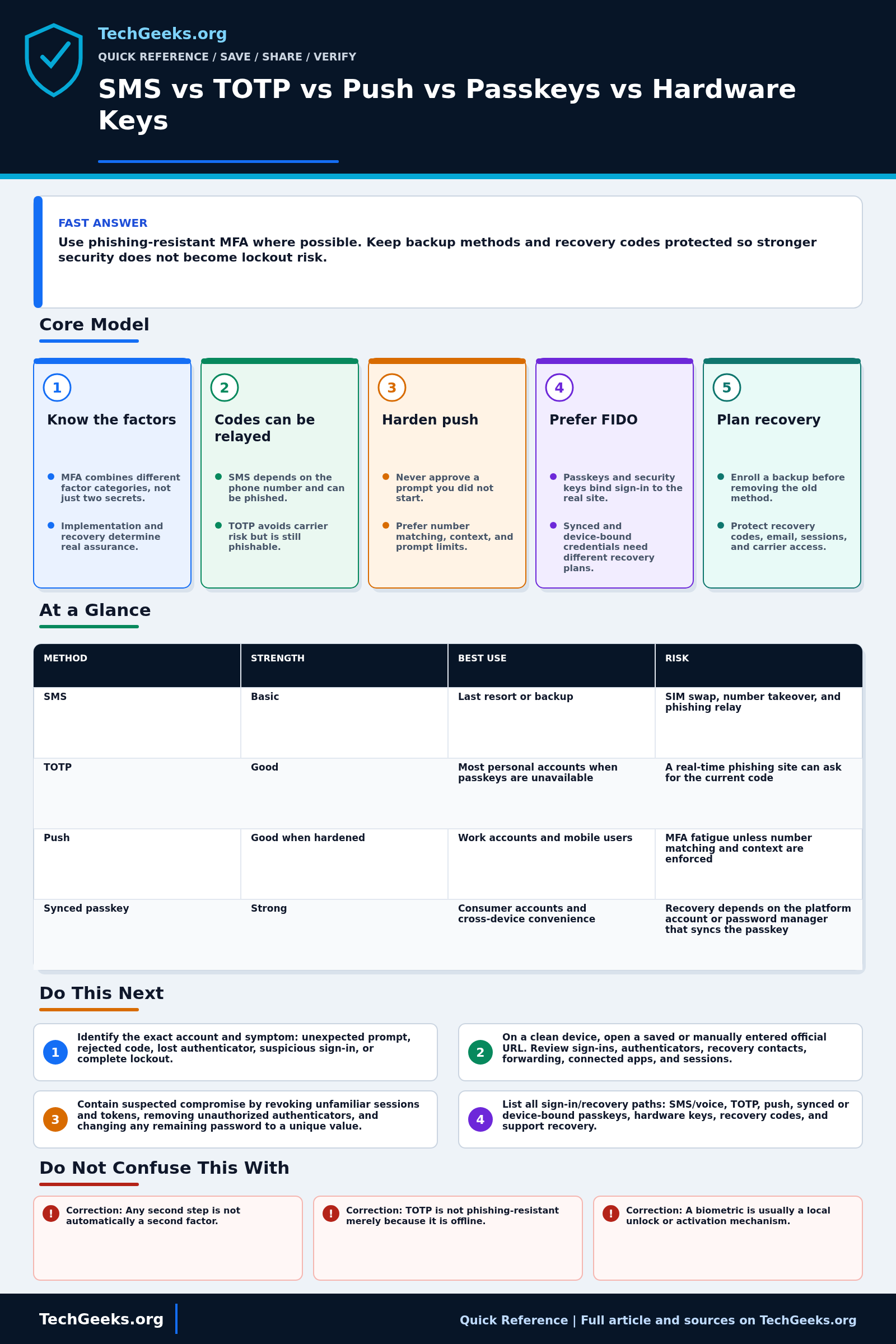
Prefer a FIDO passkey or compatible security key when the account supports it. Authenticator codes and hardened push can improve on password-only access, but they do not provide the same phishing resistance. Enroll and test a protected backup or recovery path before removing a working method. No login method makes an already stolen authenticated session token safe; review sessions separately.
Start Here: The Beginner Foundation
Multi-factor authentication, or MFA, asks for evidence from at least two different factor categories: something you know, something you have, or something you are. A password plus an SMS code, time-based one-time password (TOTP), or push approval is a familiar two-step flow because the password is knowledge and the phone or authenticator is possession. Two passwords do not become MFA, and a fingerprint is normally used to unlock an authenticator locally rather than being sent to the website. Passkeys and security keys can replace the password entirely; whether a particular deployment reaches multi-factor assurance depends on how the credential is protected, whether user verification is required, and how the service implements sign-in.
The methods do not resist the same attacks. SMS is easy to recover and broadly supported, but the phone number can be redirected and a fake site can relay the code. TOTP removes dependence on the phone network, yet a convincing phishing site can still collect a current code and use it immediately. A simple approve-or-deny push can be abused with repeated prompts; number matching and clear sign-in context make accidental approval less likely. FIDO passkeys and compatible hardware security keys use public-key cryptography bound to the real website, so the authenticator does not produce a reusable secret for a lookalike site. This is why standards bodies distinguish phishing-resistant authentication from merely adding another step.
Recovery is part of the authentication design, not paperwork to postpone. A strong key is less useful if an attacker can reset the account through weak email, SMS, or help-desk checks, and one lost device can create a lockout if no alternate path exists. Start with the email account, password manager, financial accounts, administrator accounts, and any identity provider that can reset other services. Enroll more than one usable authenticator where the service allows it, store single-use recovery codes somewhere accessible during device loss but separate from the protected account, secure the recovery email and phone, and periodically remove old devices and stale sessions. Do not remove a working fallback until the replacement and recovery path have been tested.
The Fast Comparison
| Method | Authentication property | Best use | Risk |
|---|---|---|---|
| SMS | Adds a phone-number-based step; not phishing-resistant | Last resort or backup | SIM swap, number takeover, and phishing relay |
| TOTP | Avoids phone-number delivery; codes remain phishable | Most personal accounts when passkeys are unavailable | A real-time phishing site can ask for the current code |
| Push | Number matching reduces accidental approval, not phishing relay | Work accounts and mobile users | MFA fatigue unless number matching and context are enforced |
| Synced passkey | FIDO phishing resistance with a sync-provider dependency | Consumer accounts and cross-device convenience | Recovery depends on the platform account or password manager that syncs the passkey |
| Hardware security key | FIDO phishing resistance with physical-key recovery needs | Email, password manager, admin, financial, and high-risk accounts | You need at least two enrolled keys or another planned recovery path |
Advanced Notes and Design Boundaries
An MFA ranking only makes sense against a named threat and recovery path. TOTP can be a major improvement over password-only access while still being relayable by a live phishing site; a passkey can resist that relay while remaining exposed to device compromise, weak account recovery, or theft of an authenticated session. Evaluate the primary method, fallback method, recovery desk, enrolled devices, and session controls as one system.
- NIST SP 800-63B-4 does not treat an authenticator output that a person manually enters, including OTP and out-of-band codes, as phishing-resistant because an impostor verifier can relay that output; WebAuthn provides verifier-name binding to the legitimate relying-party origin.
- TOTP is based on a shared secret and a time step. Seed exposure permits code cloning, while clock skew and a verifier's acceptance window affect reliability; rate limiting and one-time acceptance remain verifier responsibilities.
- A push flow that transfers a challenge, such as number matching, provides stronger transaction association than blind approval and reduces push-fatigue risk, but it should not be described as equivalent to FIDO phishing resistance unless the protocol itself provides the required binding.
- Synced passkeys and device-bound passkeys share FIDO's origin-bound cryptographic sign-in properties. Their operational tradeoffs differ: sync improves multi-device availability, while a device-bound credential can provide tighter device control but needs deliberate enrollment and replacement planning.
- Authenticator strength does not protect an already stolen session token or automatically harden account recovery, device enrollment, OAuth grants, or help-desk resets. High-risk services should pair strong authentication with session review, reauthentication for sensitive changes, and protected recovery workflows.
Troubleshooting Workflow
For an unexpected prompt or lockout, preserve any trusted signed-in session before changing factors. Record the account, time, device, location shown, recovery methods, and active sessions; reject unrequested pushes, then change only the suspected factor or credential so the incident trail remains understandable.
- Identify the exact account and symptom: unexpected prompt, rejected code, lost authenticator, suspicious sign-in, or complete lockout. If prompts are arriving unexpectedly, deny them and do not read a code or matching number to anyone.
- From a known-clean device and a bookmarked or manually entered official URL, inspect recent sign-ins, enrolled authenticators, recovery contacts, forwarding rules, connected applications, and active sessions. Record unfamiliar entries before removing them if incident evidence matters.
- Contain suspected compromise by revoking unfamiliar sessions and tokens, removing unauthorized authenticators, and changing any remaining password to a unique value. Secure the recovery email and mobile carrier account as separate control points.
- Inventory every enabled sign-in and recovery path, then classify each as SMS or voice, TOTP, push, synced passkey, device-bound passkey, hardware security key, recovery code, or support-assisted recovery. Weak fallbacks can determine the real account strength.
- Enroll a phishing-resistant method where supported. For device-bound hardware keys, register at least one separately stored backup key or another documented recovery method; for synced passkeys, verify access to and recovery of the credential-provider account.
- Test sign-in and recovery from a second trusted device without deleting the current working method. Store recovery codes safely, label physical keys without naming the protected account, and schedule periodic review of sessions, devices, and recovery details.
Evidence and MFA Acceptance Test
This Quick Reference is documentation-backed. TechGeeks did not independently enroll every method on every service or reproduce phishing, SIM-swap, push-fatigue, device-theft, and session-token attacks. A useful acceptance test must use the actual provider because enrollment, user verification, fallback, recovery, revocation, and session behavior are service-specific.
- Enroll the intended primary authenticator and a separately controlled backup, then sign in from a clean browser with each.
- Verify that a denied push, wrong TOTP, absent security key, or failed local user verification does not silently fall through to a weaker method.
- Complete recovery with the primary phone or key unavailable, then confirm recovery notifications reach a separate trusted channel.
- Remove one authenticator, revoke old sessions, and prove that the removed device or key no longer authorizes a new login.
- Record whether passkeys are synced or device-bound, whether user verification is required, and which help-desk or email path can reset the account.
What This Authentication Evidence Does Not Prove
- Correction: Any second step is not automatically a second factor. Two knowledge secrets are still one factor category, and implementation details determine whether a passkey or security key is used as a single- or multi-factor authenticator.
- Correction: TOTP is not phishing-resistant merely because it is offline. It avoids phone-number attacks, but a real-time phishing proxy can relay the code before it expires.
- Correction: A biometric is usually a local unlock or activation mechanism. The service generally receives a signed result or assertion, not a copy of the fingerprint or face template.
- Correction: One hardware key is not a complete recovery plan. A spare key, another well-protected authenticator, or verified account recovery is needed before the only key is lost or damaged.
Lockout, Privacy, and Incident Boundaries
Recovery codes, spare keys, and recovery email accounts are credentials. Store them outside the device most likely to be lost, but do not place all copies in an unencrypted note or photograph. Synced passkeys can improve availability while tying recovery and some metadata to a platform account; device-bound keys reduce that dependency but require deliberate spare-key and replacement planning.
If a suspicious approval was accepted or a vulnerable recovery channel was used, changing the MFA method alone is insufficient. Revoke sessions and app passwords, review account and forwarding changes, rotate the password or recovery secrets where relevant, and preserve audit records. Workplace monitoring, biometric use, and identity recovery can carry privacy and employment-policy obligations; follow the account owner's rules and applicable law rather than using this comparison as compliance advice.
Real-World Use Cases
- Use hardware keys or passkeys for email, password manager, financial, and admin accounts.
- Use synced passkeys when convenience across Apple, Google, Microsoft, or password-manager ecosystems matters and the account supports them.
- Use physical hardware keys where account takeover risk is high or where you want a possession factor that does not silently sync to every device.
- Use TOTP where passkeys or security keys are not supported.
- Keep recovery codes offline or in a trusted vault.
- Remove weak backup methods when a stronger recovery plan exists.
Failure Patterns to Recognize
- Attacker phishes password and TOTP code in real time.
- Push fatigue tricks user into approval.
- Phone number is hijacked.
- A synced passkey ecosystem account is lost, locking the user out of passkeys stored there.
- A user registers one hardware key, loses it, and has no second key or recovery path.
Common Mistakes
- Leaving SMS as the only second factor for important accounts.
- Storing recovery codes only inside the protected account.
- Approving unexpected push prompts.
- Treating synced passkeys and hardware keys as operationally identical.
- Using one hardware key with no backup key.
Quick Checklist
- Rank your most important accounts.
- Add phishing-resistant MFA where available.
- Enroll at least two hardware keys for accounts that support them.
- Confirm passkey recovery for the platform or password manager that syncs them.
- Save recovery codes securely.
- Review account recovery settings yearly.
Common Questions
Authentication Standards Checkpoint
Fact-checked July 15, 2026 against NIST SP 800-63B-4, RFC 6238, current CISA phishing-resistant MFA guidance, FIDO Alliance passkey material, and independent 2026 passkey deployment research. The standards describe properties; a service can still implement fallback, recovery, attestation, or session handling poorly.
Related TechGeeks Reading
- How Do You Recover From Losing TOTP, Passkeys, or Password Vault Access?
- Passkeys Still Need a Backup Plan
- Browser Password Managers vs Dedicated Vaults
Useful Gear And Buyer Notes
Affiliate disclosure: As an Amazon Associate, TechGeeks may earn from qualifying purchases. The product links below are buying references, not a requirement to buy a specific brand or seller. Verify compatibility, seller quality, warranty, and current specs before ordering.
Choose a security key only after checking FIDO protocol support, connector or NFC compatibility, account limits, PIN and biometric behavior, firmware policy, and recovery enrollment. Buy at least one independently stored spare for an account that cannot tolerate lockout; a single premium key is still a single point of failure.
References
- NIST SP 800-63B: Digital Identity Guidelines Authentication
- FIDO Alliance: Passkeys
- CISA: More Than a Password
- CISA: Implementing Phishing-Resistant MFA
- RFC 6238: TOTP Time-Based One-Time Password Algorithm
- USENIX Security 2026: The State of Passkeys
The July 15, 2026 review supports the relative threat and recovery distinctions above; it does not certify any provider's current enrollment, fallback, or incident-response implementation.


2 thoughts on “SMS vs TOTP vs Push vs Passkeys vs Hardware Keys”