
Cat5e vs Cat6 vs Cat6A: What To Buy and What To Avoid
 Tech Guru
Quick Answer
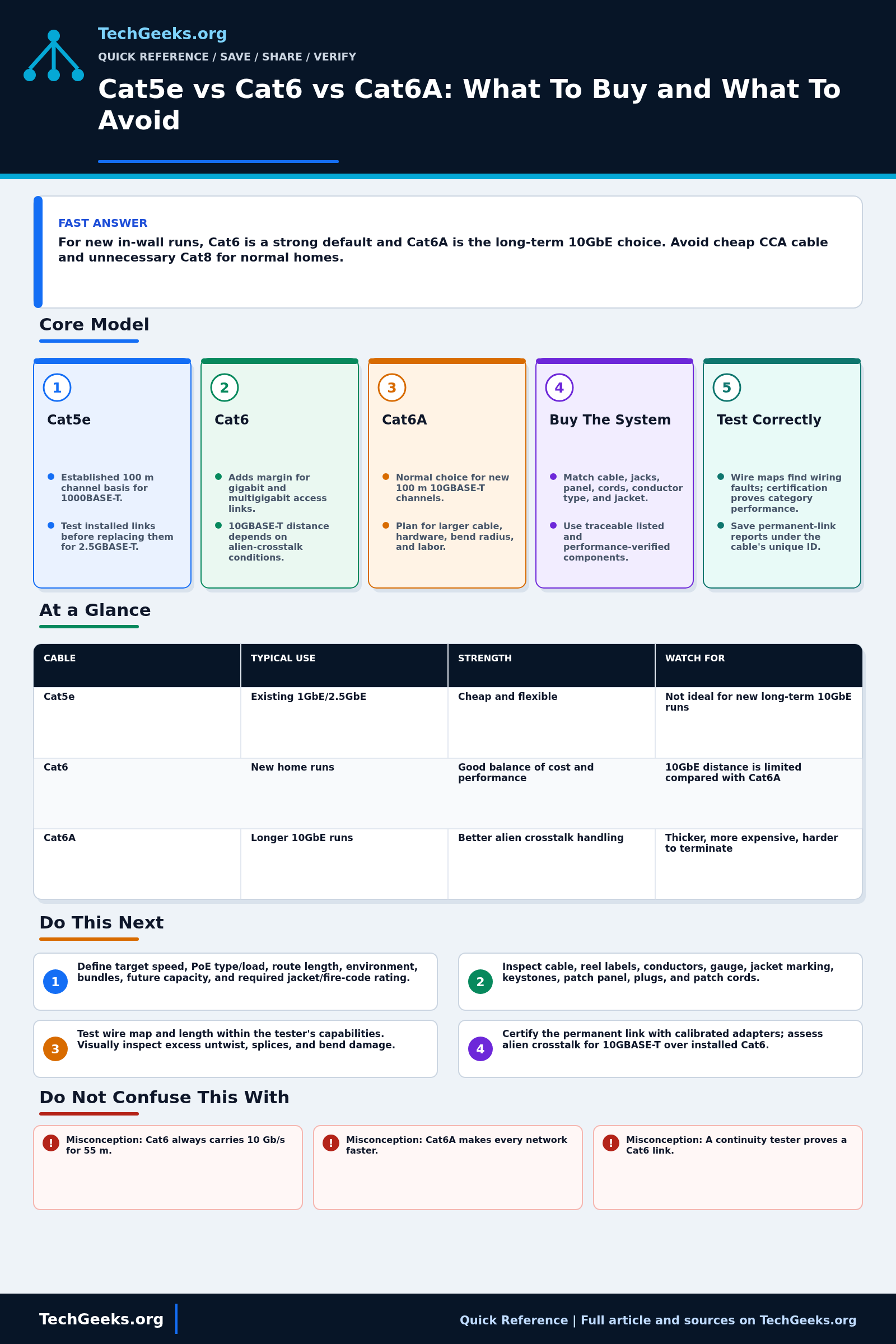
Keep sound Cat5e when testing shows it meets your intended speed. For new runs, choose Cat6 for ordinary gigabit or multigigabit service, or Cat6A for a planned 100 m 10GbE channel. Match the cable, terminations, pathway rating, and test method. Avoid copper-clad aluminum (CCA), and do not treat a marketplace category label or link light as certification.
Start Here: The Beginner Foundation
Cat5e, Cat6, and Cat6A are performance categories for balanced twisted-pair cabling and connecting hardware, not promises printed by a seller that any cable will deliver a particular speed. The installed link includes cable, jacks, patch-panel terminations, and patch cords, and it performs only as well as its components and workmanship allow. For common structured cabling, the permanent link is normally designed up to 90 m and the full channel up to 100 m including patch cords. A wire-map tester can find opens and pair mistakes, but only a certification tester can prove that the installed link meets all category limits.
Cat5e is specified to 100 MHz and remains a valid basis for 1000BASE-T channels. IEEE 2.5GBASE-T and 5GBASE-T were designed to use much of the installed Cat5e and Cat6 base, but older or bundled links can need qualification under TIA guidance, especially at 5 Gb/s. Cat6 is specified to 250 MHz and gives more margin for 1 Gb/s and multigigabit service. Existing Cat6 may support 10GBASE-T over limited distances, but alien crosstalk between neighboring cables makes the result installation-dependent; it should not be presented as a blanket 55 m guarantee.
Cat6A is specified to 500 MHz and is the normal category choice for a new 10GBASE-T channel up to 100 m. It also provides stronger alien-crosstalk control, but its cable and hardware can be larger, more expensive, and less forgiving to route and terminate. For any category, buy independently listed and performance-verified cable with the correct jacket for the pathway and local code. Solid bare-copper conductors are the usual choice for permanent links, while compliant stranded cords provide flexibility at equipment; connector type, conductor gauge, shielding, bend radius, and termination instructions must all match the product.
The Fast Comparison
| Cable | Typical use | Strength | Watch for |
|---|---|---|---|
| Cat5e | Existing 1GbE/2.5GbE | Cheap and flexible | Not ideal for new long-term 10GbE runs |
| Cat6 | New home runs | Good balance of cost and performance | 10GbE distance is limited compared with Cat6A |
| Cat6A | Longer 10GbE runs | Better alien crosstalk handling | Thicker, more expensive, harder to terminate |
Advanced Notes and Design Boundaries
The printed category does not certify an installed channel. Cable construction, total length, patch cords, termination quality, bend radius, bundle heat, alien crosstalk, and the test limit all affect the result.
- For installed Cat6 and 10GBASE-T, TIA TSB-155 says channels up to 37 m should operate, while operation from 37 m through 55 m depends on the alien-crosstalk environment. Field qualification must include alien-crosstalk assessment, not only an ordinary Cat6 autotest.
- Power over Ethernet adds DC loop resistance, resistance unbalance, connector integrity, conductor gauge, bundle size, and ambient temperature to the design. A link can pass data intermittently yet create excessive voltage drop or heating under high-power PoE.
- Shielding is a system decision. Shielded cable without compatible shielded jacks, patch panels, cords, equipment interfaces, bonding, and installation practice may not deliver the intended noise control and can complicate grounding.
- Do not infer Ethernet rate from category frequency alone. Ethernet PHYs use different coding, echo cancellation, crosstalk cancellation, and SNR requirements; 100, 250, and 500 MHz category limits are test bandwidths, not link speeds.
- Separate wire-map verification, qualification, and certification. Wire mapping proves conductor continuity and pairing, qualification estimates application support, and standards-compliant certification measures the full parameter set against a named permanent-link or channel limit.
Troubleshooting Workflow
Label both ends and record the negotiated rate, error counters, PoE events, and original patching before replacing anything. Test the permanent link separately from patch cords so a bad connector is not blamed on in-wall cable.
- Define the target Ethernet rate, PoE type and load, measured pathway length, environment, bundle conditions, future capacity, and local jacket or fire-code requirements.
- Inspect cable, reel labels, conductors, gauge, jacket marking, keystones, patch panel, plugs, and patch cords; confirm every component is genuine, category-matched, and intended for its conductor type.
- Run wire-map and length tests within the instrument's capabilities to check continuity, pairing, and length. Separately inspect terminations for excessive untwist, unexpected splices, and bend-radius damage; a basic wire map does not certify signal performance.
- Certify the fixed cabling to the correct category permanent-link limit with calibrated adapters; for 10GBASE-T over installed Cat6, perform the required alien-crosstalk assessment rather than assuming distance alone is enough.
- Connect known-good endpoints and patch cords, verify negotiated rate and duplex, run sustained bidirectional local traffic, and inspect PHY error counters, retraining, downshifts, and PoE voltage or power events.
- Save test reports by cable ID, label both ends, record room, outlet, panel, and switch mapping, and retest after any retermination or change in patch cords that affects the channel.
Evidence and Cable-Test Method
Evidence status: Category and Ethernet application claims are documentation-backed by TIA, IEEE, UL Solutions, and Fluke Networks material reviewed July 15, 2026. TechGeeks did not certify an installed Cat5e, Cat6, or Cat6A channel, test alien crosstalk, measure PoE heating, or audit a retail cable sample for this draft. A link light or speed negotiation is not equivalent to standards certification.
- Planned installation check: record cable markings, conductor material and gauge, jacket listing, route, length estimate, bend and bundle conditions, terminations, patch cords, switch and NIC models, and intended Ethernet and PoE application.
- Measure: wiremap and length first; then use an appropriate field certifier and selected category or application test limit where warranty or performance assurance matters. Follow with negotiated rate, bidirectional traffic, error counters, retransmissions, and PoE delivery under expected load.
- Accept: the complete channel passes the required test limit with saved results, remains stable under traffic and power load, and meets local pathway, separation, support, and fire-rating requirements.
Electrical, Fire, Privacy, and Recovery Boundaries
Permanent low-voltage cabling still falls under local electrical, fire, building, and workplace rules; plenum, riser, outdoor, grounding, separation, and licensed-installer requirements vary. Copper-clad aluminum can add resistance and PoE heat and should not be represented as compliant solid-copper category cable. Large PoE bundles need the cable, connector, bundle, ambient-temperature, and current assumptions evaluated together. Certification records normally contain little user data, but switch-port labels and network diagrams can expose room use and device identity. Preserve the old serviceable run until the new channel passes. If errors or heating appear, remove PoE load, revert patching, inspect terminations and bundle conditions, and avoid repeated high-power operation on a suspect link.
What the Category Marking Does Not Prove
- Misconception: Cat6 always carries 10 Gb/s for 55 m. Correction: Installed Cat6 support depends on length and alien crosstalk; use Cat6A for a standards-based new 100 m 10GBASE-T design.
- Misconception: Cat6A makes every network faster. Correction: It raises cabling performance margin, but endpoints and switch ports still negotiate the Ethernet rate and may remain at 1 or 2.5 Gb/s.
- Misconception: A continuity tester proves a Cat6 link. Correction: It finds wiring faults but does not measure insertion loss, return loss, crosstalk, delay, or other category certification parameters.
- Misconception: Any cable advertised as Cat7 or Cat8 is an upgrade for a home run. Correction: Application, channel length, connector system, listing, and verified category matter more than a marketplace number; Cat6A is the established 100 m 10GBASE-T option.
Real-World Use Cases
- Use solid copper for normal in-wall permanent links.
- Use flexible stranded cords for device patching and verify that any concealed cable is listed for its exact pathway.
- Use riser/plenum jacket where code requires.
- Test every run after termination.
Failure Patterns to Recognize
- A pair fault can prevent gigabit training; some PHYs downshift to 100 Mbps while others fail or flap.
- PoE device drops because of bad copper or termination.
- 10GbE fails on marginal long Cat6 runs.
- Cheap patch cables are actually CCA.
Common Mistakes
- Buying Cat8 for normal home runs.
- Using flat cable for permanent installs.
- Ignoring wall rating and fire code.
- Terminating Cat6A into parts not rated for Cat6A.
Quick Checklist
- Choose speed and distance target.
- Buy solid copper cable.
- Match keystones/patch panel to category.
- Label both ends.
- Check continuity and negotiated rate, then qualify or certify the installation for the intended application; keep the report by cable ID.
Common Questions
Useful Gear And Buyer Notes
Affiliate disclosure: As an Amazon Associate, TechGeeks may earn from qualifying purchases. The product links below are buying references, not a requirement to buy a specific brand or seller. Verify compatibility, seller quality, warranty, and current specs before ordering.
For permanent runs, verify solid copper conductors, conductor gauge, jacket and fire listing for the installation space, third-party certification, reel length, and matching jacks and patch panels. Avoid copper-clad aluminum presented as standards-compliant horizontal cable.
- Amazon search: Cat6 bulk cable solid copper
- Amazon search: Cat6A patch panel
- Amazon search: RJ45 cable tester
Related TechGeeks Reading
- 2.5GbE vs 10GbE ties the cabling decision to actual switch, NIC, NAS, and workload requirements.
- Mesh Is Not Always the Answer explains when wired backhaul is the more reliable Wi-Fi improvement.
- A Business-Grade UniFi Home Network provides a worked home-network context for switches, PoE, and structured cabling.
References
- TIA: Cabling standards overview
- Fluke Networks Knowledge Base
- TIA Announcement: ANSI/TIA-568.2-E Balanced Twisted-Pair Cabling
- IEEE 802.3-2022 Ethernet Standard
- IEEE 802.3bz: 2.5GBASE-T and 5GBASE-T
- TIA TSB-5021 Guidance for Installed Cat5e and Cat6
- Fluke Networks: 10GBASE-T Field Testing Requirements
- UL Solutions Wire and Cable Application Guide


One thought on “Cat5e vs Cat6 vs Cat6A: What To Buy and What To Avoid”