DHCP vs DNS: What Breaks When Each One Fails
 Tech Guru
Quick Answer
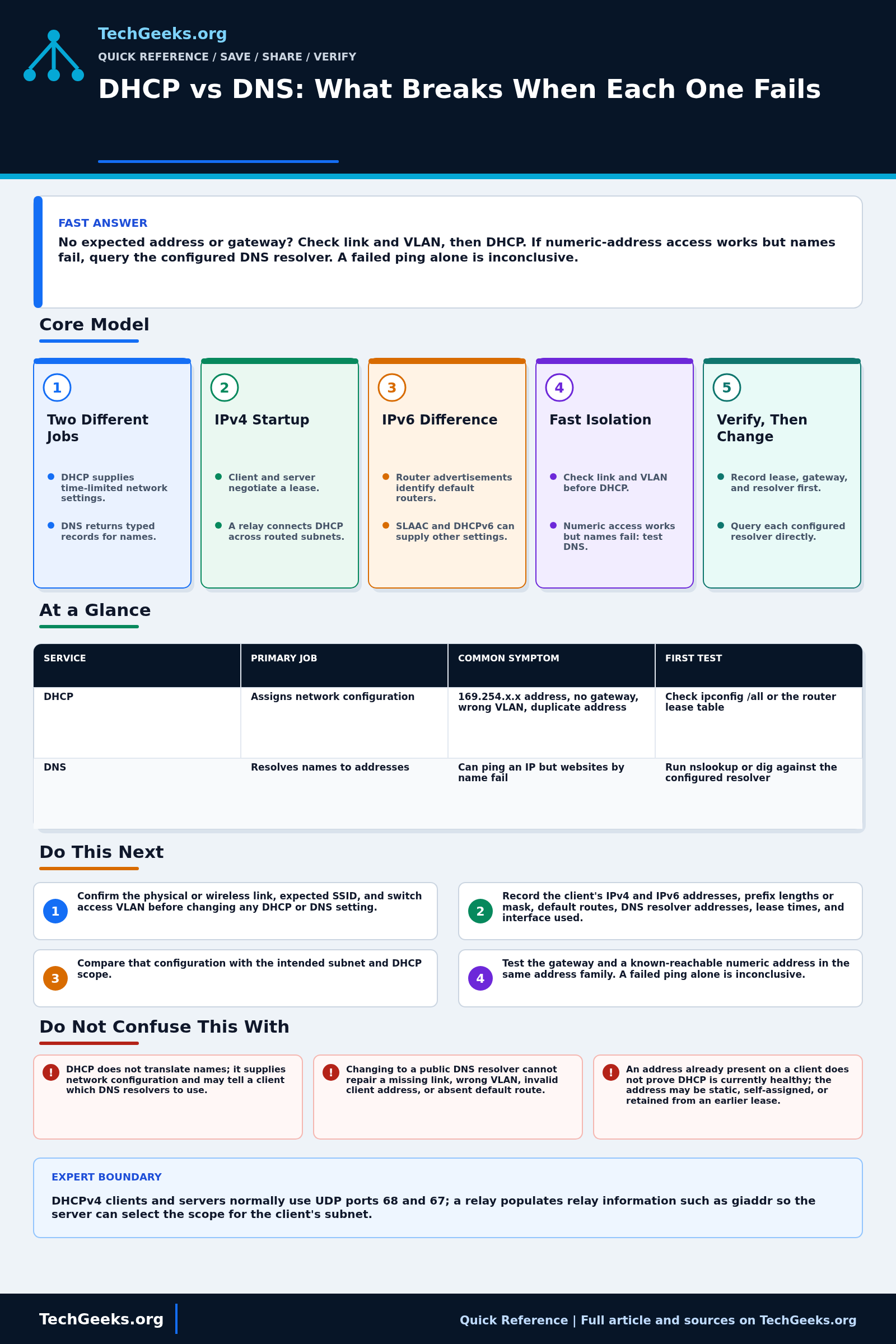
If a client lacks its expected IP address or gateway, check the link and VLAN, then DHCP. If its network settings and numeric-address reachability work but names fail, query the configured DNS resolver. A failed ping alone proves neither service is broken. Record the current settings before renewing a lease or flushing a cache, and check IPv4 and IPv6 separately.
Start Here: The Beginner Foundation
DHCP and DNS solve different setup problems. DHCP gives a client the network configuration it needs for a period of time, commonly an IPv4 address, prefix or subnet mask, default gateway, and DNS resolver addresses. DNS is a distributed naming system: a resolver asks DNS servers for records such as the IPv4 or IPv6 address associated with a name. A home router often provides a DHCP server and forwards or caches DNS queries, but putting both services in one box does not make them the same service.
On a typical IPv4 LAN, a new client can begin without a usable address and exchange DHCP messages to discover a server, request an offered address, and receive an acknowledgment. Because the first messages are broadcasts, a routed network normally needs a DHCP relay to reach a server on another subnet. IPv6 setup is different: router advertisements provide on-link and default-router information, while SLAAC and optionally DHCPv6 provide addresses or other settings. In particular, DHCPv6 is not the source of the IPv6 default route.
Troubleshooting starts by separating configuration from naming. If the client lacks an expected address, prefix, gateway, or lease, investigate link state, VLAN placement, the DHCP scope, and any relay. If those settings are sound, test a destination by numeric address and then query the configured DNS resolver for a known name. A successful numeric connection with failed name resolution points toward DNS, but a failed ping alone does not prove either service is broken because routing, firewall policy, or the target can affect the result.
The Fast Comparison
| Service | Primary job | Common symptom | First test |
|---|---|---|---|
| DHCP | Assigns network configuration | 169.254.x.x address, no gateway, wrong VLAN, duplicate address | Check ipconfig /all or the router lease table |
| DNS | Resolves names to addresses | Can ping an IP but websites by name fail | Run nslookup or dig against the configured resolver |
Advanced Notes and Design Boundaries
A router can hand out a valid lease while its DNS forwarding fails. Check the lease and resolver separately, including the IPv4 or IPv6 path each test actually uses.
- DHCPv4 clients and servers normally use UDP ports 68 and 67; a relay populates relay information such as giaddr so the server can select the scope for the client's subnet.
- When DHCPv4 options T1 and T2 are absent, RFC 2131 defines renewal and rebinding defaults of 0.5 and 0.875 of the lease duration, respectively; clients can therefore keep working while a server is briefly unavailable.
- DHCP option 6 identifies DNS recursive resolver addresses, but those resolvers are not necessarily authoritative for the names a client asks about and may forward, recurse, filter, or cache answers.
- DNS answers are typed and cached: A and AAAA map names to IPv4 and IPv6 addresses, CNAME expresses an alias, and negative responses can also be cached according to DNS rules.
- DHCPv6 can provide addresses, delegated prefixes, and configuration options, but IPv6 neighbor discovery router advertisements establish default-router information; do not diagnose a missing IPv6 default route as a DHCPv6 option failure.
Troubleshooting Workflow
Capture the client's address, prefix, gateway, DNS servers, lease timestamps, and failing query before renewing or flushing anything. Those transient values often identify whether the break is DHCP, DNS, routing, or policy.
- Confirm the physical or wireless link, expected SSID, and switch access VLAN before changing any DHCP or DNS setting.
- Record the client's IPv4 and IPv6 addresses, prefix lengths or mask, default routes, DNS resolver addresses, lease times, and interface used.
- Compare that configuration with the intended subnet and DHCP scope; for IPv4, renew the lease while capturing the result rather than assigning a speculative static address.
- Test the local gateway and one known reachable numeric address using the correct address family, then inspect routes and firewall policy if either test fails.
- Query a known name directly against each configured resolver with nslookup, dig, or Resolve-DnsName, and compare the response code, record type, and returned address.
- If the fault remains, inspect DHCP leases and relay counters plus DNS server logs or packet captures, correlating timestamps, client identifiers, VLAN, and source subnet.
Evidence and Fault-Isolation Method
Evidence status: Protocol behavior is documentation-backed by the current RFC Editor records for DHCPv4, DHCPv6, DNS, and IPv6 Neighbor Discovery, with operational corroboration from ISC material reviewed July 15, 2026. TechGeeks did not reproduce a DHCP or DNS outage, inspect the reader's packets, or benchmark a public resolver for this draft. A successful ping or cached lookup proves only that one path worked at that moment.
- Planned observation: before renewing or flushing, record interface state, IPv4 and IPv6 addresses and prefixes, default routes, DHCP server and lease times, configured resolvers, search suffixes, VPN state, and one exact failing name.
- Isolate: test the local gateway, a permitted known numeric destination, and direct queries to each configured resolver; then correlate client output with authorized packet captures, DHCP leases, DNS logs, relay counters, firewall events, and authoritative records.
- Accept: the client receives the intended network parameters, renews through the correct server or relay, resolves uncached test names through the expected path, and reaches the application without bypassing required filtering or split-horizon DNS policy, where internal and external clients intentionally receive different answers.
Security, DNS Privacy, Authorization, and Rollback
Rogue DHCP can redirect gateways and resolvers, while malicious or compromised DNS can redirect names; use trusted network controls, authenticated administration, and monitoring rather than treating either service as harmless plumbing. DNS queries reveal browsing and service use, and encrypted DNS changes who can observe them rather than eliminating trust. Browser, VPN, operating-system, and router resolver settings may conflict with family or enterprise filtering. Capture only traffic you are authorized to inspect and protect hostnames, client identifiers, and packet files. Export scopes, reservations, options, zones, forwarding rules, and TTLs before changes. If a replacement service fails, restore the previous configuration, avoid overlapping DHCP servers, account for cached DNS answers and existing leases, and retest from a clean client state.
What a Passing Network Test Does Not Prove
- DHCP does not translate names; it supplies network configuration and may tell a client which DNS resolvers to use.
- Changing to a public DNS resolver cannot repair a missing link, wrong VLAN, invalid client address, or absent default route.
- An address already present on a client does not prove DHCP is currently healthy; the address may be static, self-assigned, or retained from an earlier lease.
- DHCPv6 does not provide the IPv6 default gateway; hosts learn default routers from IPv6 router advertisements.
Real-World Use Cases
- Use DHCP reservations for infrastructure devices that need predictable addresses.
- Use separate DHCP scopes for separate VLANs or subnets.
- Use DNS names for services instead of memorizing IP addresses.
- Document which device provides DHCP and which resolver clients receive.
Failure Patterns to Recognize
- Wrong DHCP scope on the wrong VLAN.
- Missing DHCP relay between VLANs.
- Router hands out ISP DNS when you expected local filtering.
- DNS cache points to an old address after a service moves.
Common Mistakes
- Changing DNS when the client does not even have a gateway.
- Blaming DHCP because one website will not load.
- Using static IP addresses without documenting them.
- Running multiple DHCP servers on the same LAN by accident.
Quick Checklist
- Check IP address, subnet mask, gateway, and DNS server.
- Ping the gateway.
- Test a permitted, known-reachable numeric address. Some hosts block ping, so a failed reply alone is inconclusive.
- Resolve a known domain name.
- Check DHCP leases and DNS logs if available.
Common Questions
Useful Gear And Buyer Notes
Affiliate disclosure: As an Amazon Associate, TechGeeks may earn from qualifying purchases. The product links below are buying references, not a requirement to buy a specific brand or seller. Verify compatibility, seller quality, warranty, and current specs before ordering.
Do not buy a replacement router because one lookup fails. First confirm link state, lease behavior, numeric-IP reachability, resolver responses, and whether a VPN, browser secure-DNS setting, filtering service, or split-horizon zone changes the path.
Related TechGeeks Reading
- Make DNS Keep Working When the Internet Is Down develops the resilience side of local name service.
- Fix DNS Once: Router vs PC vs Browser maps conflicting resolver controls across the stack.
- Homelab DNS Guide covers local names, filtering, and reliable resolver design.
References
- RFC 2131: Dynamic Host Configuration Protocol
- RFC 1034: Domain Names Concepts and Facilities
- RFC Editor: RFC 2131, Dynamic Host Configuration Protocol
- RFC Editor: RFC 8415, Dynamic Host Configuration Protocol for IPv6
- RFC Editor: RFC 1034, Domain Names - Concepts and Facilities
- RFC Editor: RFC 1035, Domain Names - Implementation and Specification
- RFC Editor: RFC 4861, Neighbor Discovery for IPv6