
Ping vs Tracert/Traceroute: Reachability vs Path Troubleshooting
 Tech Guru
Quick Answer
Use ping to test ICMP reachability and round-trip time. Use tracert or traceroute to observe which hops answer a particular set of probes. A failed ping or silent intermediate hop does not prove an outage: filtering and rate limits can suppress replies. Compare the destination and actual application from the same client, address family, and VPN state before blaming a transit router.
Start Here: The Beginner Foundation
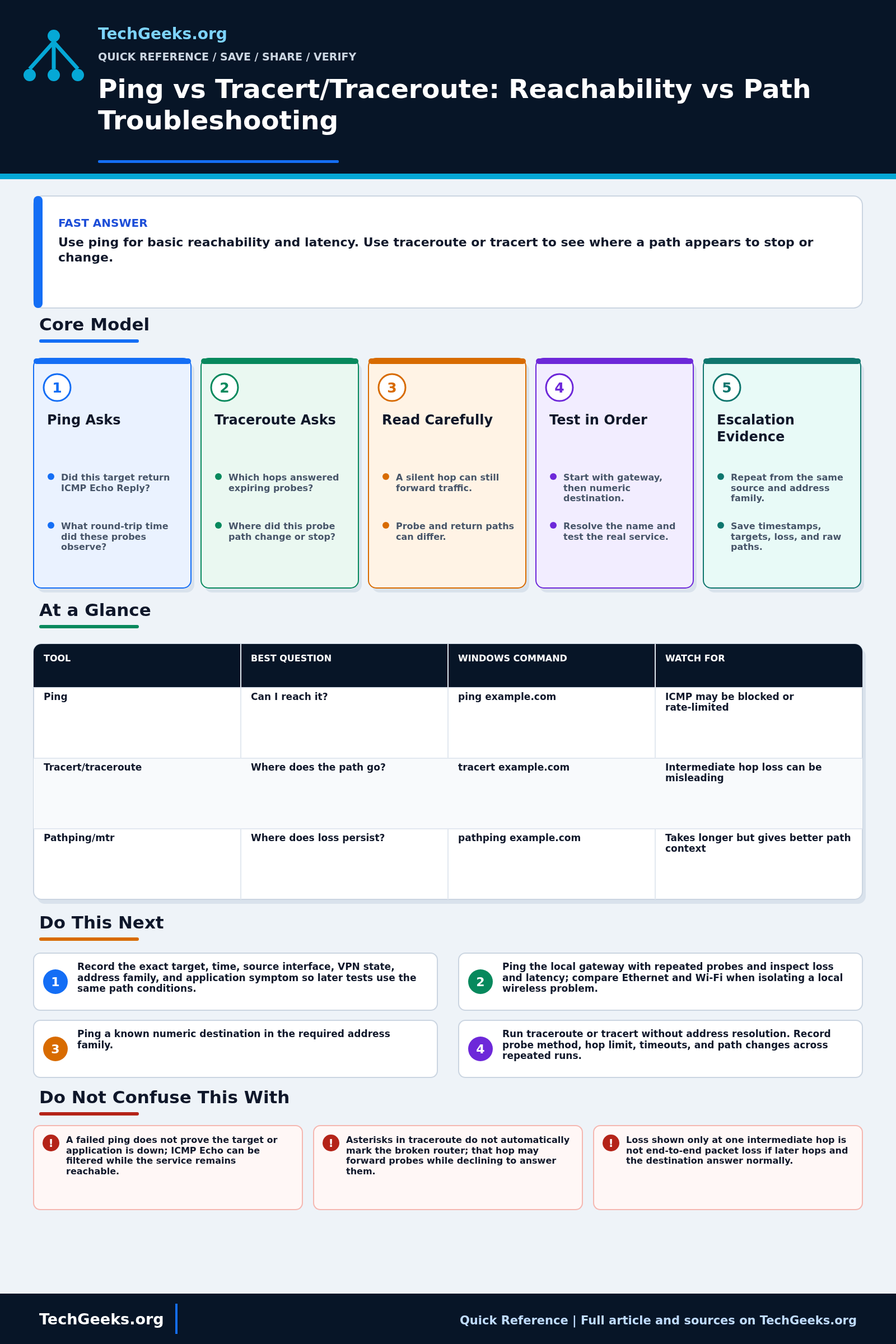
Ping sends an ICMP Echo Request and looks for an Echo Reply from the target. It can report round-trip time, missing replies, and changes across repeated probes. That makes it useful for checking one form of IP reachability and comparing latency under controlled conditions. It does not prove that a web, DNS, VPN, or other application is healthy, and a missing reply does not prove the host is down because a firewall or rate limit can treat ICMP differently from application traffic.
Traceroute discovers responding points along a path by sending probes with progressively larger IPv4 TTL or IPv6 Hop Limit values. A router that reduces the value to zero can return an ICMP Time Exceeded message, revealing one interface address for that hop. The destination eventually returns a response determined by the probe method. Windows tracert commonly uses ICMP Echo probes, while traceroute implementations can use UDP, ICMP, TCP, or other methods, so two tools can receive different treatment and show different results.
Neither output is a literal, permanent map of every router. Load balancing can send probes over multiple paths, return traffic may follow a different route, routers can suppress or deprioritize control-plane replies, and paths can change during the test. Interpret end-to-end behavior first. A silent intermediate hop followed by a responsive destination is not an outage at that hop, while loss that begins at one hop and continues consistently to the destination is stronger evidence worth correlating with repeated tests and application measurements.
The Fast Comparison
The commands below are unperformed examples, not captured TechGeeks results. Use an authorized target and record the tool, address family, and probe settings with the output.
| Tool | Best question | Windows command | Watch for |
|---|---|---|---|
| Ping | Can I reach it? | ping example.com | ICMP may be blocked or rate-limited |
| Tracert/traceroute | Where does the path go? | tracert example.com | Intermediate hop loss can be misleading |
| Pathping/mtr | Where does loss persist? | pathping example.com | Takes longer but gives better path context |
Advanced Notes and Design Boundaries
Ping and traceroute are probe tools, not verdict engines. Ping observes whether a target returns the chosen ICMP exchange and reports round-trip behavior; traceroute infers responding hops for a particular probe method and flow. Firewalls, control-plane rate limits, load balancing, address family, return-path asymmetry, and application protocol can all produce a different result.
- Ping reports round-trip time measured at the source, not one-way delay; clock synchronization is not required, but forward and reverse path latency are combined.
- ICMP Echo and Time Exceeded processing may be filtered or rate-limited independently of transit forwarding, so control-plane response loss can coexist with healthy data-plane traffic.
- Classic traceroute varies TTL or Hop Limit and correlates ICMP replies to probes; Equal-cost multipath (ECMP) hashing can change the path when probe ports or other flow fields change, producing apparent parallel hops.
- A hop address usually identifies the interface chosen as the source of the ICMP response, which may not be the interface where the probe arrived and may resolve to an unhelpful or stale DNS name.
- Packet-size tests with IPv4 Don't Fragment or IPv6 Packet Too Big handling can investigate path MTU, but blocked ICMP errors can create a failure pattern that ordinary small pings do not expose.
Troubleshooting Workflow
Keep source, target, address family, interface, VPN state, probe method, packet size, count, timeout, and test time constant while comparing results. Save raw output before changing DNS or routes, and test the actual application from the same client so ICMP behavior is never mistaken for service health.
- Record the exact target, time, source interface, VPN state, address family, and application symptom so later tests use the same path conditions.
- Ping the local gateway with repeated probes and inspect loss and latency; compare Ethernet and Wi-Fi when isolating a local wireless problem.
- Ping a known numeric destination in the required address family, then ping or resolve the target name separately to distinguish reachability from DNS behavior.
- Run traceroute or tracert with address resolution disabled first, noting the probe method, maximum hops, timeouts, and any path changes across repeated runs.
- Test the actual application protocol and port from the same source because successful or failed ICMP behavior may not match TCP, UDP, or encrypted application traffic.
- Correlate persistent end-to-end loss or latency with interface counters, firewall logs, path monitoring, and packet captures; save raw output with timestamps for provider escalation.
Evidence and Path-Test Acceptance Method
This Quick Reference is documentation-backed. TechGeeks did not independently measure the reader's LAN, ISP, VPN, CDN, or destination, and a single trace is not presented as a permanent route map. Research confirms that UDP, ICMP, and TCP probe methods can infer different paths, so the method is part of the evidence.
- Record source interface, target name and resolved addresses, IPv4 or IPv6, VPN state, time, and the user-visible application symptom.
- Measure the local gateway first, then a numeric external target, then the target name to separate local reachability, wider routing, and DNS.
- Run repeated ping samples and at least two comparable traces with reverse DNS disabled; note probe method, timeouts, and path variation.
- Test the actual TCP or UDP service and correlate endpoint results with interface counters, firewall logs, and a short authorized packet capture.
- Treat a suspected fault location as a hypothesis until repeated destination and application tests corroborate it. Degradation that persists beyond a hop is more useful than an isolated slow reply, but an asymmetric return path can still complicate location.
What ICMP and Hop Replies Do Not Prove
- A failed ping does not prove the target or application is down; ICMP Echo can be filtered while the service remains reachable.
- Asterisks in traceroute do not automatically mark the broken router; that hop may forward probes while declining to answer them.
- Loss shown only at one intermediate hop is not end-to-end packet loss if later hops and the destination answer normally.
- Traceroute usually shows a path observed by its probes, not a guaranteed reverse path or a stable list of every physical router.
Authorization, Privacy, and Recovery Boundaries
Run diagnostic probes only from systems and against networks you are authorized to test. Normal ping and traceroute are low-impact, but aggressive rates, broad target sweeps, unusual protocols, or oversized packets can trigger defenses or violate policy. Use the smallest probe set that answers the question and coordinate managed-network tests.
Saved traces, DNS names, private addresses, VPN paths, timestamps, and provider tickets can expose topology and user-location information. Redact sensitive details before sharing traces or tickets. Before route, firewall, MTU, or VPN changes, export the current configuration and preserve a local management path; after each change, rerun the same baseline instead of stacking fixes.
Real-World Use Cases
- Ping the gateway before blaming the ISP.
- Ping an IP address before blaming DNS.
- Use tracert when one destination or path behaves differently.
- Compare wired and Wi-Fi results to isolate local wireless issues.
Failure Patterns to Recognize
- Firewall blocks echo replies.
- DNS resolves a different CDN target each time.
- Router rate-limits TTL-expired replies.
- VPN changes the path and hides local routing issues.
Common Mistakes
- Assuming a failed ping means the service is down.
- Treating packet loss on one intermediate hop as proof of a bad ISP.
- Only testing by domain name when DNS may be the failure.
- Ignoring local gateway latency.
Quick Checklist
- Ping gateway.
- Ping resolver IP.
- Ping destination name.
- Run tracert/traceroute.
- Repeat from wired and wireless clients.
- Record time, loss, and exact target.
Common Questions
Command and Protocol Recheck
Fact-checked July 15, 2026 against current Microsoft ping and tracert documentation, Microsoft's TCP/IP troubleshooting guidance, RFC 792, RFC 4443, and independent traceroute probe-method research. The ICMP specifications are stable; defaults and available flags vary by operating system and tool version.
Related TechGeeks Reading
- Remote Access Without Opening Router Ports
- Homelab VLAN Design: Simple Network Segmentation That Works
- OPNsense vs pfSense vs UniFi vs a Consumer Router
Useful Gear And Buyer Notes
Affiliate disclosure: As an Amazon Associate, TechGeeks may earn from qualifying purchases. The product links below are buying references, not a requirement to buy a specific brand or seller. Verify compatibility, seller quality, warranty, and current specs before ordering.
Purchase a wired adapter or cable tester only after isolating the missing evidence. Verify chipset and driver support, negotiated speed, VLAN needs, connector type, and return policy for an adapter; distinguish a continuity tester from a certifier. Neither accessory substitutes for packet capture, switch counters, or an application-level test.
References
- Microsoft Learn: ping command
- Microsoft Learn: tracert command
- RFC Editor: RFC 792, Internet Control Message Protocol
- RFC Editor: RFC 4443, ICMPv6 for IPv6
- Microsoft Learn: Use TRACERT to Troubleshoot TCP/IP Problems
- University of Waikato: Traceroute Probe Method and Path Inference
The July 15, 2026 review supports the interpretation method, not a diagnosis of any present LAN, ISP, transit hop, VPN, CDN, or destination.
One thought on “Ping vs Tracert/Traceroute: Reachability vs Path Troubleshooting”