Modem vs Router vs Gateway Explained
 Tech Guru
Quick Answer
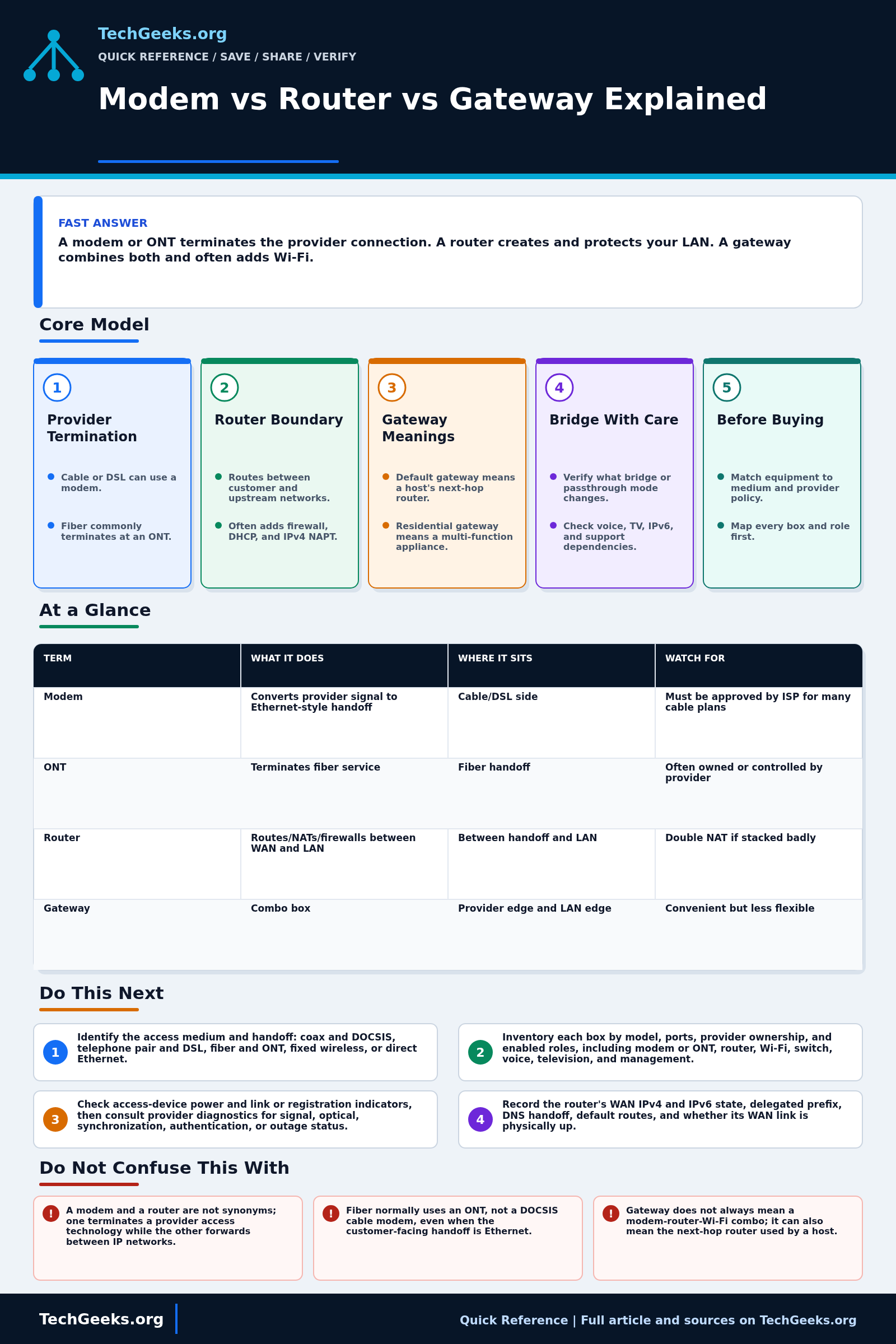
A modem or optical network termination (ONT) handles the provider connection; a router forwards between your LAN and upstream networks. A residential gateway can combine those jobs with Wi-Fi, while a default gateway simply means the next-hop router. Identify every active role before replacing or bridging equipment, especially provider-managed voice, television, and recovery access. A standalone modem upgrade does not fix Wi-Fi coverage.
Start Here: The Beginner Foundation
A modem terminates a provider access technology that uses modulation over a medium, such as a DOCSIS cable network or DSL line, and presents service toward customer equipment. Fiber service usually uses an optical network termination, or ONT, rather than a cable or DSL modem. Fixed wireless and Ethernet-delivered services use still other handoffs. These access devices may present Ethernet, but their provider-facing technology, provisioning, compatibility, and ownership rules differ, so the correct replacement must match the actual service.
A router joins IP networks and forwards packets between them. At a residential edge it commonly establishes the WAN connection, provides the LAN default gateway, routes IPv4 and IPv6, applies firewall policy, uses network address and port translation (NAPT) for many private IPv4 flows, and may run DHCP and DNS forwarding. None of those bundled services changes the core distinction: the modem or ONT terminates the access link, while the router creates the IP boundary between the customer networks and upstream service.
The word gateway is context-dependent. A host's default gateway is the next-hop router used for destinations that are not on-link. A residential gateway is an appliance class that can combine routing, firewall, switching, Wi-Fi, voice, management, and sometimes the modem or ONT function. Before replacing or bridging anything, identify every physical handoff and logical role. This avoids buying a cable modem for fiber, creating double NAT behind a provider gateway, or disabling a box that the provider needs for voice or television service.
The Fast Comparison
| Term | What it does | Where it sits | Watch for |
|---|---|---|---|
| Modem | Converts provider signal to Ethernet-style handoff | Cable/DSL side | Must be approved by ISP for many cable plans |
| ONT | Terminates fiber service | Fiber handoff | Often owned or controlled by provider |
| Router | Routes/NATs/firewalls between WAN and LAN | Between handoff and LAN | Double NAT if stacked badly |
| Gateway | Combo box | Provider edge and LAN edge | Convenient but less flexible |
Advanced Notes and Design Boundaries
The labels describe functions, not guaranteed boxes. A cable modem may only terminate DOCSIS, a fiber ONT converts the provider's optical access service, a router forwards between the WAN and LAN, and a residential gateway may combine routing, Wi-Fi, switching, voice, and provider management. Diagnose the actual handoff and enabled functions instead of assuming the product name reveals the topology.
- Cable modems must match the operator's DOCSIS network, service tier, provisioning, and approved-device policy; a technically newer DOCSIS revision does not by itself guarantee activation or tier support.
- An ONT terminates an optical access network at the customer premises and may be integrated with other customer-premises functions, but it is not generically interchangeable with a DOCSIS or DSL modem.
- Residential gateways can expose routed, bridged, or passthrough modes; those labels are vendor-specific, so verify whether public addressing, IPv6 delegation, firewalling, and management remain on the provider device.
- A router WAN address that is private, shared CGN space, or otherwise different from the externally observed IPv4 address indicates an upstream addressing or translation layer, but it does not by itself prove a fault.
- Gateway is overloaded terminology: in Internet standards, older documents use gateway for an IP router, while broadband specifications use residential gateway for a multi-function customer-premises device.
Troubleshooting Workflow
Start broadband troubleshooting at the ownership boundary. Record the provider device model, link lights, WAN addressing, gateway mode, router WAN address, and a wired test result before rebooting or factory-resetting anything. Change bridge or passthrough mode only with the old configuration, support contact, and a direct recovery connection available.
- Identify the access medium and handoff: coax and DOCSIS, telephone pair and DSL, fiber and ONT, fixed wireless, or direct Ethernet.
- Inventory each box by model, ports, provider ownership, and enabled roles, including modem or ONT, router, Wi-Fi, switch, voice, television, and management.
- Check access-device power and link or registration indicators, then consult provider diagnostics for signal, optical, synchronization, authentication, or outage status.
- Record the router's WAN IPv4 and IPv6 state, delegated prefix, DNS handoff, default routes, and whether its WAN link is physically up.
- Compare the WAN address with upstream or externally observed addressing and inspect the provider box for routed, bridged, or passthrough mode to locate extra routing or NAT layers.
- Test directly at each supported boundary without bypassing provider safety or provisioning requirements, then restore the intended topology and document the failing device or service.
Evidence and Handoff Acceptance Test
This explanation is documentation-backed; TechGeeks did not validate every cable modem, ONT, ISP gateway, voice service, or bridge-mode implementation. The acceptance test belongs on the subscriber's actual circuit because provider provisioning, VLANs, authentication, IPv6 delegation, telephony, and remote management vary.
- Draw the path from provider medium to modem or ONT, gateway/router, switch or access point, and one wired client.
- Record the router WAN address, default route, DNS source, IPv6 prefix delegation, and whether the provider device also holds a private LAN address.
- After any bridge or passthrough change, renew the router WAN lease and test wired browsing, DNS, IPv4, IPv6, voice, television, and provider management as applicable.
- Confirm there is only one intended routing/NAT boundary, or document why double NAT remains and which device owns each port forward.
- Restore the previous provider-device mode and router configuration without a factory reset; that rollback is the final acceptance step.
What the Device Labels Do Not Prove
- A device label does not prove which routing, NAT, firewall, Wi-Fi, voice, or management functions are active; verify the live topology and configuration.
- A modem and a router are not synonyms; one terminates a provider access technology while the other forwards between IP networks.
- Fiber normally uses an ONT, not a DOCSIS cable modem, even when the customer-facing handoff is Ethernet.
- Gateway does not always mean a modem-router-Wi-Fi combo; it can also mean the next-hop router used by a host.
- Bridge mode is not guaranteed to disable every provider feature or pass every address family unchanged; behavior must be checked for the specific service and device.
Provider, Privacy, and Recovery Boundaries
A rented gateway or ONT may remain provider property and may carry voice, television, alarm, or remote-diagnostic services. Do not remove, open, replace, or factory-reset provider equipment merely because a retail router is available. Check subscriber terms, compatibility lists, return obligations, and support consequences; this guide is not authority to alter a carrier network.
Gateway telemetry, DNS settings, remote administration, and cloud-managed Wi-Fi can expose household usage and topology metadata. Disable unnecessary administration paths, keep firmware supported, export configurations where possible, and record the direct recovery address and credentials offline. If bridge mode fails, recover locally before changing more routing, DHCP, or firewall variables.
Real-World Use Cases
- Use supported bridge or passthrough mode when your own router should own the edge, after checking dependent provider services and rollback.
- Keep the provider gateway if voice service, TV, or support requirements depend on it.
- Buy an approved cable modem only after checking your ISP compatibility list.
- Do not replace the modem to fix Wi-Fi coverage unless the modem is also the Wi-Fi gateway.
Failure Patterns to Recognize
- Double NAT complicates inbound mappings, peer-to-peer traffic, or some VPNs, even while ordinary outbound browsing works.
- ISP gateway Wi-Fi is overloaded or poorly placed.
- Bring-your-own modem not authorized for your plan.
- Router WAN gets a private address from another router.
Common Mistakes
- Calling every ISP box a router and replacing the wrong thing.
- Adding your own router behind the ISP gateway without bridge mode or planned double NAT.
- Buying DOCSIS hardware for fiber service.
- Expecting a modem swap to improve LAN switching speed.
Quick Checklist
- Identify whether your provider handoff is cable, fiber, DSL, or fixed wireless.
- Check if your current box is in gateway or bridge mode.
- Look at your router WAN address.
- Confirm who runs Wi-Fi and DHCP.
- Check ISP approved hardware before buying.
Common Questions
Broadband Standards and Provider Recheck
Fact-checked July 15, 2026 against CableLabs DOCSIS 3.1 and 4.0 material, the Broadband Forum TR-124 Issue 9 residential-gateway requirements, ITU optical-access topology guidance, RFC 1812, and the FCC consumer broadband guide. These sources establish roles and interfaces, not support for a specific retail modem or a provider's bridge-mode menu.
Related TechGeeks Reading
- OPNsense vs pfSense vs UniFi vs a Consumer Router
- Remote Access Without Opening Router Ports
- 2.5GbE vs 10GbE: Which Home Network Upgrade Is Worth It?
Useful Gear And Buyer Notes
Affiliate disclosure: As an Amazon Associate, TechGeeks may earn from qualifying purchases. The product links below are buying references, not a requirement to buy a specific brand or seller. Verify compatibility, seller quality, warranty, and current specs before ordering.
Buy only after the ISP confirms the exact modem or gateway model, hardware revision, access technology, speed tier, voice requirement, and activation process. For a separate router, verify WAN speed, IPv6 prefix delegation, VLAN/authentication needs, supported firmware life, recovery access, and return policy rather than choosing by Wi-Fi branding alone.
- Amazon search: DOCSIS 3.1 cable modem
- Amazon search: WiFi 7 router
- Amazon search: Intel N100 firewall appliance
References
- FCC: Measuring Broadband America technical definitions
- CableLabs: DOCSIS 3.1 technology
- CableLabs: Public DOCSIS Specifications
- CableLabs: DOCSIS 4.0 Technology
- Broadband Forum: TR-124 Issue 9 Residential Gateway Requirements
- ITU-T L.250: Topologies for Optical Access Network
- RFC Editor: RFC 1812, Requirements for IP Version 4 Routers
The July 15, 2026 review verifies the functional distinctions, but only the provider can confirm provisioning and support for a particular circuit, modem, ONT, or gateway firmware.