Mesh Wi-Fi vs Access Points: Which Should You Install?
 Tech Guru
Quick Answer
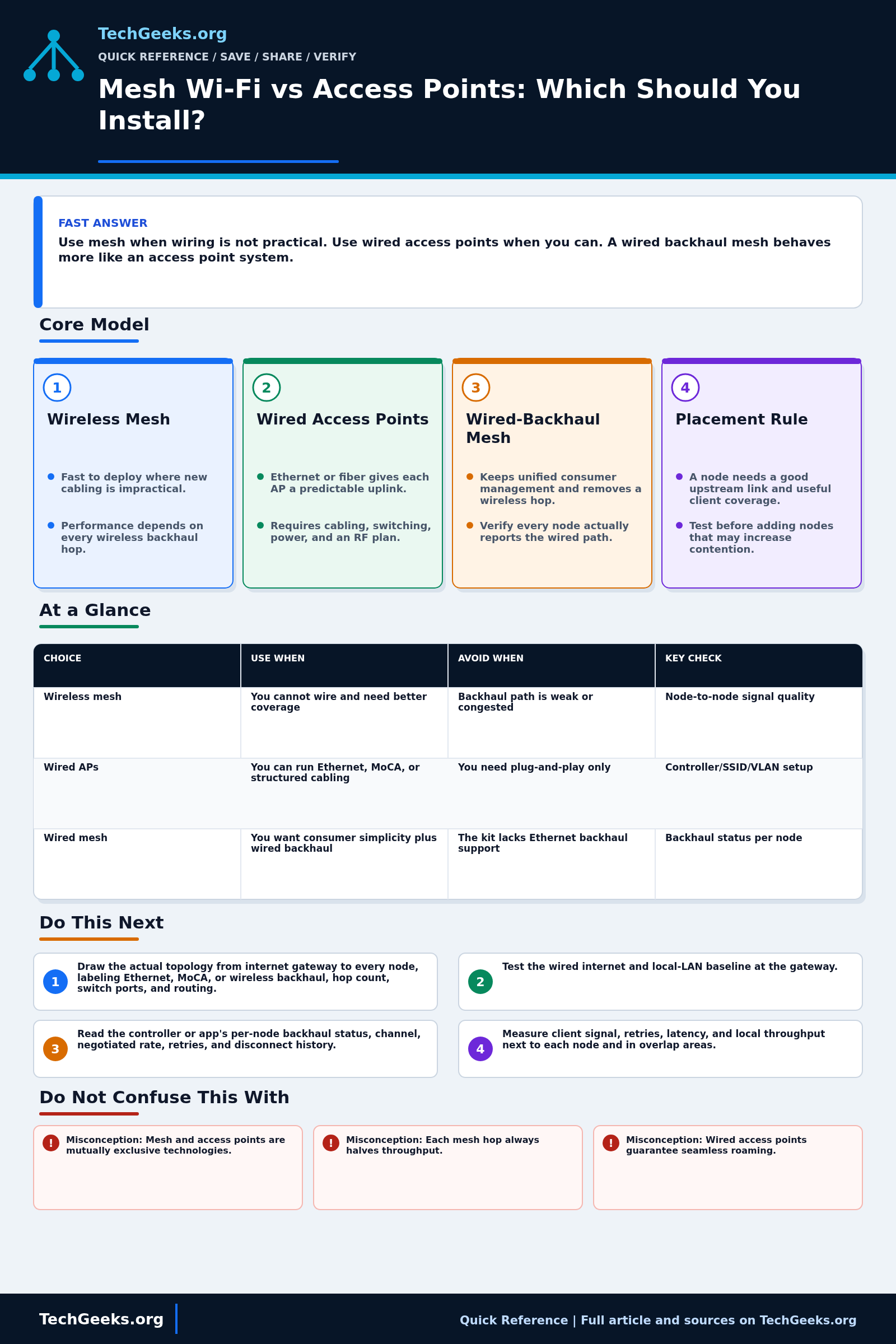
Use wired access points when practical cabling can provide reliable backhaul to the router. Use wireless mesh when wiring is impractical and each node has a strong upstream radio path. A mesh kit with working wired backhaul can combine simple management with a wired data path. Check placement and per-node backhaul before adding nodes; wired links alone do not guarantee seamless roaming.
Start Here: The Beginner Foundation
Backhaul is the connection that carries an access point's client traffic toward the rest of the network. A mesh Wi-Fi product coordinates multiple nodes and may use wireless links between them. A conventional access-point design normally connects each AP to the network over Ethernet. Those descriptions overlap more than product marketing suggests: a mesh kit may support wired backhaul, and controller-managed APs may support wireless mesh links for locations without cable. The useful question is therefore not only which label is on the box, but how every radio reaches the router, what management features are available, and whether the system supports the required VLANs and operating mode.
Wireless backhaul is convenient because a node needs only power, but the backhaul must cross the same walls and compete for radio airtime. Client traffic that traverses one or more wireless hops can be constrained by the weakest hop and by whether backhaul shares a radio and channel with clients. A dedicated backhaul radio, a strong high-band link, or careful channel coordination can reduce that cost, so the common claim that every mesh hop always cuts speed exactly in half is too simple. Placement remains critical: a node in the dead zone may show a good signal to nearby clients while forwarding them over a poor link to the rest of the network.
Wired APs usually provide more predictable backhaul capacity, lower variability, and easier power delivery through PoE. They require cable, a switch, and sometimes more deliberate controller, channel, and VLAN configuration. Roaming is not created by the backhaul itself; a client decides when to leave one AP, although standards-based assistance and coordinated settings can help. For many homes the practical middle ground is a consumer mesh system with Ethernet or Multimedia over Coax Alliance (MoCA) backhaul over suitable coax cable, which keeps simple management while removing the wireless hop from the main data path.
The Fast Comparison
| Choice | Use when | Avoid when | Key check |
|---|---|---|---|
| Wireless mesh | You cannot wire and need better coverage | Backhaul path is weak or congested | Node-to-node signal quality |
| Wired APs | You can run Ethernet, MoCA, or structured cabling | You need plug-and-play only | Controller/SSID/VLAN setup |
| Wired mesh | You want consumer simplicity plus wired backhaul | The kit lacks Ethernet backhaul support | Backhaul status per node |
Advanced Notes and Design Boundaries
The product label does not expose the actual data path. Capacity and stability follow each node's wired or wireless uplink, radio and channel allocation, hop count, interference, client mix, roaming implementation, switch topology, routing mode, and the management features retained after installation.
- Model the topology per node. Record each uplink medium, band, channel, width, PHY rate, retries, and hop count; a healthy client association does not reveal a degraded node-to-node path.
- Avoid a universal throughput penalty formula. Single-radio repeating, shared fronthaul/backhaul, dedicated tri-band backhaul, multi-link operation, and wired backhaul have different airtime costs and bottlenecks.
- Roaming support such as neighbor reports, transition suggestions, and fast transition can reduce scan or authentication delay, but client implementations and application tolerance still control the user-visible result. Test voice or video while moving, not only stationary speed tests.
- When enabling Ethernet backhaul, follow the vendor's supported topology and routing or bridge mode. Multiple live backhaul paths can create loops unless the platform intentionally detects and manages them.
- More APs are not automatically more capacity. Excessive cell overlap, high transmit power, poor channel reuse, and hidden nodes can increase contention and sticky-client behavior even when signal bars look excellent.
Troubleshooting Workflow
Establish the wired and gateway baseline before moving nodes or changing channels. Repeat the same local throughput, latency, retry, and walking test after each placement or backhaul change so internet variation does not get credited to Wi-Fi.
- Draw the actual topology from internet gateway to every node, labeling Ethernet, MoCA, or wireless backhaul, hop count, switch ports, and routing or bridge mode.
- Test the wired internet and local-LAN baseline at the gateway, then test an Ethernet device at each cabled AP location so upstream faults are separated from Wi-Fi faults.
- Read the controller or app's per-node backhaul status, channel, negotiated rate, retries, and disconnect history; do not rely only on a green health icon.
- Measure client signal, retries, latency, and local throughput next to each node and in overlap areas, then repeat while walking through the reported roaming path.
- Temporarily move or wire the weak node and rerun the same tests. A large improvement points toward backhaul or placement. Isolate those variables before treating either as the confirmed cause or buying another node.
- Finalize the smallest effective node count, channel and power plan, then document node locations, backhaul type, firmware, and expected test results for future comparison.
Evidence and Acceptance Checks
The topology and roaming explanations are documentation-backed by current IEEE material and vendor deployment guidance. RTINGS provides independent wired-versus-wireless backhaul measurements and publishes limits of its mesh range methodology. TechGeeks did not survey a building, capture frames, compare mesh products, measure roaming interruption, or benchmark Ethernet, MoCA, and wireless backhaul for this draft.
- Coverage acceptance: representative clients maintain the required signal, retry rate, latency, and local throughput in each work area, not merely next to a node.
- Backhaul acceptance: every node reports the intended Ethernet, MoCA, or radio uplink and retains it after reboot; cabled nodes meet the tested wired baseline within expected protocol overhead.
- Mobility acceptance: a real call, stream, or latency probe stays within the application's interruption tolerance along important walking paths.
- Resilience acceptance: gateway, switch, controller, and node restarts restore the expected topology without a loop, surprise routing layer, duplicate DHCP service, or cloud-only recovery dependency.
Security, Privacy, Installation, and Recovery Boundaries
Use supported security modes, unique administration credentials, current firmware, protected remote management, and intentional guest or IoT isolation. Cloud-managed Wi-Fi can expose client identity, device names, location patterns, and traffic metadata; review retention, account access, and household or workplace notice. Obtain authorization before surveying networks you do not own. New Ethernet, PoE, coax, penetrations, and plenum or fire-stop work must follow equipment limits and local building and electrical requirements.
Export the configuration and record SSIDs, security, router or bridge mode, VLANs, channels, node locations, cable paths, and the working gateway before migration. Keep local administrative access and the old Wi-Fi available under a different SSID during a staged cutover. If performance or isolation regresses, restore the old gateway and AP topology rather than factory-resetting every client; avoid simultaneous routing from old and new systems unless that transition is deliberately designed.
What This Does Not Mean
- Misconception: Mesh and access points are mutually exclusive technologies. Correction: Mesh describes coordination and often wireless backhaul, while an AP is the radio providing client access; many mesh nodes are APs and may also use Ethernet.
- Misconception: Each mesh hop always halves throughput. Correction: Shared-radio repeating often has a major airtime cost, but the result depends on radios, channels, traffic direction, link rates, scheduling, and topology.
- Misconception: Wired access points guarantee seamless roaming. Correction: Wired backhaul improves the data path, but client decisions, RF overlap, security, and roaming assistance determine handoff behavior.
- Misconception: Adding another node always fixes a dead zone. Correction: A poorly placed node can add contention while preserving a weak backhaul; moving an existing node or wiring it may work better.
IEEE and vendor documents describe mechanisms and supported topology; they do not prove performance in a reader's walls or interference environment. RTINGS measured selected products in its own setup, so its results do not supply a universal wired-backhaul gain, roaming guarantee, or node count. A stationary speed test also does not validate roaming, latency under load, VLAN isolation, or recovery after a controller outage.
Real-World Use Cases
- Wire APs when possible.
- Use MoCA if coax is easier than new Ethernet.
- Place each node where it has a strong upstream link and still covers the target area; do not rely on a fixed halfway rule.
- Use fewer well-placed APs before adding many weak ones.
Failure Patterns to Recognize
- Mesh node uses weak wireless backhaul.
- Too many APs create roaming and channel problems.
- All nodes sit in a line behind thick walls.
- The router and satellites use the same congested channels.
Common Mistakes
- Buying more nodes before testing placement.
- Ignoring wired backhaul ports.
- Putting APs inside metal racks or cabinets.
- Mixing multiple Wi-Fi systems with overlapping SSIDs and no plan.
Quick Checklist
- Map where signal drops.
- Temporarily move a node and retest.
- Check backhaul status.
- Test wired speed at AP locations.
- Prefer Ethernet or MoCA backhaul when possible.
Common Questions
Useful Gear And Buyer Notes
Affiliate disclosure: As an Amazon Associate, TechGeeks may earn from qualifying purchases. The product links below are buying references, not a requirement to buy a specific brand or seller. Verify compatibility, seller quality, warranty, and current specs before ordering.
Confirm the operating mode and feature matrix before buying a kit or AP. Check Ethernet-backhaul topology, radio allocation, bridge mode, VLAN and guest support, PoE requirements, local administration, subscription dependence, update policy, and whether the advertised ports and bands are available simultaneously.
- Amazon search: mesh WiFi wired backhaul
- Amazon search: PoE WiFi access point
- Amazon search: MoCA 2.5 adapter kit
Related TechGeeks Reading
- Mesh Isn't Always the Answer expands the placement and backhaul decision.
- Wi-Fi 7 and Wi-Fi 8 Buyer's Guide separates current capabilities from marketing labels.
- Ubiquiti UniFi for a Home Network provides one controller-managed AP context without making it the universal choice.
Check Features in the Mode You Will Use
Verify Ethernet-backhaul support, bridge or router mode, VLAN and guest behavior, roaming assistance, and subscription requirements for the exact system and firmware. Keep the topology and client limits attached to any published performance comparison. Your placement, interference, and moving-client tests determine whether the design works in the building.