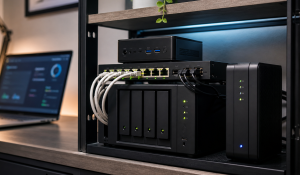
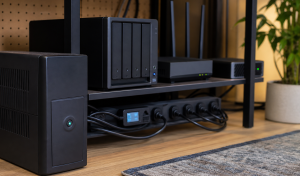
Used Enterprise Server vs Mini PC: Which Homelab Buy Makes Sense?
 Tech Guru
Used enterprise servers are worth it when you need PCIe lanes, drive bays, ECC memory, lab realism, or noisy hardware experience. Mini PCs are usually better for always-on home services because they are quiet, efficient, cheap to power, and easy to replace.
Design principle: Buy the platform that fits the workload, power budget, noise tolerance, and recovery plan, not the cheapest listing or biggest spec sheet.
The Short Version
- Used enterprise servers are worth it when you need PCIe lanes, drive bays, ECC memory, lab realism, or noisy hardware experience. Mini PCs are usually better for always-on home services because they are quiet, efficient, cheap to power, and easy to replace.
- Use the decision matrix below, then prove the result with the validation checklist before making it the default.
Why This Matters Now
The useful answer starts with the operating model. Who depends on this service, what breaks when it is unavailable, and how quickly does it need to be restored? Those questions matter more than the product name. Tie this decision to the candidate's inventory, measured behavior, workload pilot, and recovery result.
The cheapest rack server can become expensive after electricity, rails, disks, noise control, and replacement parts.
Mini PCs changed the beginner homelab market because a low-power x86 box can run Proxmox, Docker, DNS, and media services comfortably.
Enterprise gear is still useful when the goal is learning enterprise hardware, storage controllers, redundant power, and out-of-band management.
The rest of this guide turns that context into a baseline design, implementation order, validation checks, and buying notes. That is the TechGeeks bias: a setup is not good because it worked once. It is good when it can be explained, tested, and recovered. Keep the existing host available until backup, unattended restart, monitoring, and one service restore pass.
Recommended Baseline
Choose hardware from the workload backward. DNS, Docker, media services, light Proxmox, and monitoring usually favor quiet low-power mini PCs. PCIe expansion, many disks, ECC memory, IPMI, storage-controller practice, and enterprise realism may justify used enterprise gear. GPIO, edge projects, and tiny single-purpose services can still justify a Raspberry Pi.
The baseline is full ownership cost: purchase price, RAM, drives, caddies, rails, adapters, NICs, UPS capacity, idle watts, noise, heat, firmware, replacement parts, and the backup plan. A free server that idles high and cannot live anywhere sane is not free.
Decision Matrix
| Choice | Best Fit | Watch Point |
|---|---|---|
| Mini PC | Always-on services, low noise, low power. | Limited drive bays and PCIe expansion. |
| Used tower workstation | More RAM, PCIe, and storage without rack noise. | Bigger and less efficient than mini PCs. |
| Used rack server | Enterprise learning, many drives, IPMI, labs. | Noise, heat, power, and parts. |
| NAS plus mini PC | Best split for many homes. | Two systems to back up and monitor. |
Decision Worksheet
Before copying the recommendation, fill out this worksheet for your own home or lab. The right answer can change when the same tool is used for family photos, router access, media playback, cameras, or a disposable test stack. Scope the conclusion to the exact hardware revision, firmware, components, location, and electricity rate.
| Worksheet Item | What To Write Down | Why It Matters |
|---|---|---|
| Primary question | Is used enterprise hardware still worth it, or should I buy mini PCs? | This keeps the article tied to the reader's real decision instead of drifting into a generic product comparison. |
| Affected systems | Always-on services, storage, UPS capacity, power bill, noise, heat, replacement parts, and whoever fixes failures. | Readers should know who and what they are protecting before they choose hardware, software, or a cloud service. |
| Failure model | High idle draw, loud fans, failing used disks, missing caddies, unsupported firmware, weak expansion, and no restore path. | Different failures need different controls. This row prevents RAID, sync, VPN, or MFA from being treated as magic. |
| Proof test | Measure idle watts, run the intended workload, reboot unattended, and restore one backed-up service on the candidate hardware. | A recommendation is not proven until it survives a small, repeatable test using realistic data, clients, or accounts. |
| Rollback path | Keep the old host or service path available until backups, monitoring, and restore are proven on the new hardware. | A reversible change is less stressful, easier to explain, and less likely to turn a weekend project into an outage. |
| Measurement to capture | Idle watts, peak watts, noise, heat, and annual power cost. | Numbers, logs, screenshots, or restore notes give the reader confidence that the decision was based on evidence. |
Price The Whole Ownership Loop
A used rack server can be cheap to buy and expensive to live with. Add RAM, disks, caddies, rails, HBA, replacement fans, UPS capacity, idle watts, heat, noise, and the time required to keep old firmware sane. A mini PC is boring by comparison, which is exactly why it wins many always-on home roles.
Buy enterprise gear when the learning objective is enterprise gear: IPMI, redundant power, storage controllers, ECC memory, multi-NIC routing, or large lab clusters. Buy mini PCs when the goal is reliable DNS, Docker, Proxmox basics, media services, or a quiet home server.
Real-World Example
Consider a used rack server idling around 120W beside an Intel N100 mini PC idling around 10W to 15W. At $0.15/kWh, the 120W server costs about $157.68 per year to idle, while a 12W mini PC costs about $15.77. At $0.30/kWh, the gap is roughly $315 versus $31. That difference can pay for RAM, SSDs, backup media, or a quieter replacement within a few years.
The right answer depends on the role. If the goal is DNS, Docker, Home Assistant, monitoring, and a few lightweight VMs, the mini PC usually wins because it is quiet, easy to place, and cheap to keep powered. If the goal is learning IPMI, redundant power, HBAs, drive shelves, ECC memory, and noisy enterprise failure modes, used enterprise hardware may be exactly the lab you want.
Do not compare only purchase price. Compare three-year ownership: power, storage, RAM, caddies, rails, NICs, UPS headroom, replacement parts, and where the device can physically live. Hardware that cannot be tolerated in the room where it must run becomes a reliability problem, not just an annoyance.
Rollout And Recovery Plan
Roll new hardware in as a parallel host when possible. Move one low-risk workload first, monitor power and thermals for several days, then restore a backed-up service onto the new machine. If the hardware is used or unfamiliar, burn-in and firmware review matter more than adding critical services quickly.
Recovery means the workload can move again later. Keep installation notes, BIOS settings, storage layout, backup targets, and replacement-part assumptions outside the machine itself. If a used server or mini PC fails, the next host should be inconvenient, not mysterious.
Implementation Details
Implement this in a maintenance window, even if the word maintenance feels too formal for a home lab. The point is to avoid changing several hidden dependencies while someone else expects the internet, photos, media, smart home, or passwords to keep working. Record idle and representative-load power, acoustics, health output, and included parts before cutover.
- Write the workload list before shopping: VMs, containers, NAS, media, learning, AI, firewall, or backup.
- Estimate idle watts and annual energy cost using your utility rate.
- Check RAM type, drive caddies, rails, HBA mode, BIOS update path, and firmware licensing.
- Prefer mini PCs for services that must run 24/7 in occupied space.
- Prefer enterprise hardware for labs where learning the hardware is the point.
Record these details while you build, not after the memory has already gone fuzzy:
- Idle watts, peak watts, noise, heat, and annual power cost.
- RAM ceiling, storage bays, PCIe expansion, NIC options, and firmware support.
- Replacement-part availability, warranty status, and physical placement constraints.
- Restore result for one real service on the candidate hardware.
Evidence To Collect
The article should leave the reader with something they can verify. Collecting evidence sounds formal, but it can be as small as a restored folder, a router config export, a playback dashboard capture, or a clean-browser login test. Purchase only when a written workload or expansion requirement justifies the ownership cost.
- Full purchase list including RAM, SSDs, drives, caddies, rails, NICs, adapters, power cables, and UPS capacity.
- Measured idle watts and yearly power cost for the candidate hardware.
- Noise and heat notes from the location where the device will actually run.
- Firmware, BIOS, replacement-part, and warranty/support status.
- A restore test showing one real workload can be rebuilt on the chosen hardware.
Failure Signals
- The hardware was cheap to buy but expensive to power, cool, or place.
- Replacement parts, drive caddies, firmware, or RAM are difficult to source.
- The host runs critical services before restore, monitoring, and reboot behavior are proven.
- Noise or heat forces the machine into a bad location with poor access or airflow.
Adopt, Pilot, Defer, Avoid
- Adopt: Adopt the hardware that meets the workload with acceptable power, noise, expansion, parts, and restore behavior.
- Pilot: Pilot one noncritical service on the candidate box before moving DNS, photos, backups, or identity services.
- Defer: Wait when the current setup is stable, backed up, monitored, and the proposed change is mostly curiosity.
- Avoid: Avoid hardware that is cheap only because power, noise, heat, parts, and support were left out of the math.
Validation Checklist
- The chosen hardware can be backed up and rebuilt.
- Idle power is measured after installation, not guessed from specs.
- Noise is acceptable at the planned location.
- Replacement storage, RAM, power supplies, and fans are available.
- The UPS can support the real load long enough for shutdown.
Common Mistakes
- Buying a $50 server that costs more than a mini PC in annual power.
- Ignoring drive caddies, rails, and proprietary parts.
- Putting loud rack gear in a closet with poor airflow.
- Confusing enterprise realism with household reliability.
- Using old servers for simple DNS, sync, and small Docker workloads.
Troubleshooting
| Symptom | Likely Cause | First Check |
|---|---|---|
| Cheap server costs too much | Idle watts, drive count, fans, or UPS overhead were not included. | Measure wall draw and calculate annual cost before adding more workloads. |
| Mini PC hits limits | The workload needs drive bays, PCIe, RAM, or sustained I/O the mini PC cannot provide. | Separate compute, storage, and network requirements instead of treating the box as one score. |
| Used hardware behaves oddly | Firmware, failing storage, unsupported adapters, or thermal issues are present. | Update firmware, check SMART data, run memory tests, and monitor temperature under load. |
Maintenance Cadence
The best design is the one that still makes sense three months later. Put these checks on a calendar so the setup does not depend on memory. Tie this decision to the candidate's inventory, measured behavior, workload pilot, and recovery result.
- Monthly: Check idle watts, firmware notices, storage health, temperature, fan noise, and whether the workload still matches the hardware.
- Quarterly: Reboot unattended, restore a small workload, and confirm remote/admin access survives updates.
- Yearly: Compare power cost, replacement parts, warranty/support status, and whether a smaller or quieter platform now fits better.
Hardware maintenance should include power, noise, temperature, firmware, and restore checks. A cheap host stops being cheap when it becomes unpleasant to keep alive.
When To Spend Money
Product links make sense only after the reader knows what problem the purchase solves. Use this table to keep buying advice tied to evidence, not anxiety or a tempting sale price. Keep the existing host available until backup, unattended restart, monitoring, and one service restore pass.
| Stage | Signal | Practical Buying Guidance |
|---|---|---|
| Do not buy yet | The workload, power budget, noise limit, expansion needs, and backup plan are not written down. | Price the whole ownership loop before comparing listings. |
| Small useful spend | The existing host is close but needs a reliability or rebuild improvement. | RAM, SSD, spare boot drive, NIC, labels, UPS capacity, or backup media. |
| Larger upgrade | Measured workload, power, noise, expansion, or replacement-part limits justify a new platform. | Mini PC, used workstation, NAS plus compute split, or enterprise server only when the workload needs it. |
Useful Gear And Buyer Notes
The product links below are intentionally search links, starting with Intel N100 mini PC 16GB, because model numbers, bundles, and prices change quickly. Use them to compare categories, then verify exact specifications against the article's decision points before buying. For infrastructure gear, prioritize firmware support, replaceability, warranty, idle power, and recovery behavior over headline specs.
Affiliate disclosure: As an Amazon Associate, TechGeeks may earn from qualifying purchases. The product links below are buying references, not a requirement to buy a specific brand or seller. Verify compatibility, seller quality, warranty, and current specs before ordering.
- Amazon search: Intel N100 mini PC 16GB
- Amazon search: used business mini PC i5
- Amazon search: tower workstation refurbished
- Amazon search: server rack shelf
- Amazon search: 2.5GbE switch
Related TechGeeks resources
- Linux and Homelab Notes: Start Here
- Monitoring and Health Checks for a Plex and Arr Homelab
- Media Server Storage Design: NAS, CIFS/NFS Mounts, Permissions, and Local Cache
What This Does Not Protect or Validate
This guide is documentation-backed. TechGeeks did not purchase, meter, acoustically test, benchmark, or inspect a used server or mini PC for this revision. Used inventory, seller condition, firmware access, replacement parts, electricity rates, and platform support change quickly; verify the exact service tag, component list, measured wall power, and return terms before buying.
It also does not replace a full security, backup, or disaster-recovery program. The goal is to give you a practical design, the tests that prove it, and the boundaries that keep the recommendation honest. Scope the conclusion to the exact hardware revision, firmware, components, location, and electricity rate.
Used hardware can be a good lab value, but it may arrive with worn storage, old firmware, missing parts, vendor locks, or power and noise costs that change the decision. A successful power-on self-test does not prove storage health, memory stability, remote-management licensing, firmware availability, hypervisor compatibility, sustained performance, or acceptable noise. A seller's wattage claim or one idle reading also does not prove annual energy cost; measure the configured system across representative idle and load periods.
Practical FAQ
Is used enterprise hardware still worth it, or should I buy mini PCs?
Used enterprise servers are worth it when you need PCIe lanes, drive bays, ECC memory, lab realism, or noisy hardware experience. Mini PCs are usually better for always-on home services because they are quiet, efficient, cheap to power, and easy to replace. The important next step is to validate the recommendation with one small test before treating it as the default.
References
- U.S. Department of Energy: Estimating Home Electronic Energy Use
- Proxmox VE Installation and Hardware Requirements
- TrueNAS SCALE Hardware Guide
- ServeTheHome Project TinyMiniMicro Overview
Final Thought
The right answer is the one you can operate, document, test, and recover without guessing.