Access Port vs Trunk Port: VLAN Ports Explained
 Tech Guru
Quick Answer
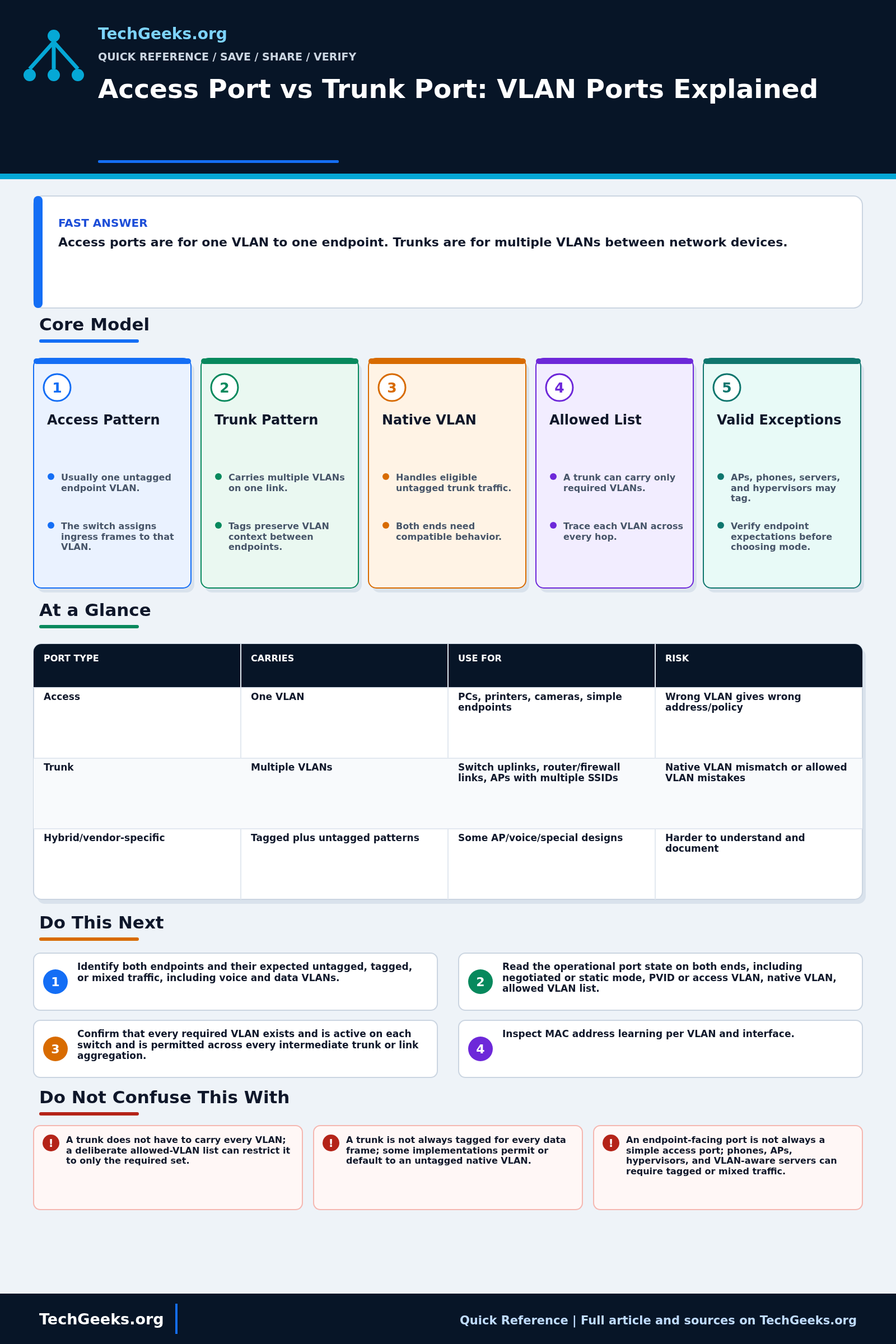
Use an access port for an endpoint that normally sends untagged traffic on one VLAN. Use a trunk when a link must carry the required tagged VLANs to a switch, firewall, access point, or VLAN-aware host. Match both ends, including native-VLAN handling and allowed VLANs. Voice and hybrid ports need additional checks; a VLAN assignment is not a firewall rule.
Start Here: The Beginner Foundation
Access port and trunk port are widely used vendor terms for common VLAN port patterns, not the complete vocabulary of IEEE 802.1Q. An access port normally attaches a device that sends ordinary untagged Ethernet frames. The switch classifies those ingress frames into one configured VLAN, often through the port VLAN identifier (PVID), and usually transmits that VLAN's frames untagged toward the endpoint. This is the simplest pattern for desktops, printers, cameras, and other devices that do not need to understand VLAN tags.
A trunk port normally carries traffic for multiple VLANs across one physical or aggregated link. Frames for most carried VLANs contain an 802.1Q tag so the receiving switch, router, firewall, server, or access point can preserve VLAN context. A trunk has an allowed set of VLANs rather than an obligation to carry every VLAN. Some designs also carry one VLAN untagged, often called the native VLAN, but defaults and egress behavior vary across vendors and platforms.
Port roles can be more complex than the shorthand suggests. A virtualization host, VLAN-aware server, firewall, or multi-SSID access point can be a legitimate trunk endpoint. An IP phone may use untagged data plus a tagged voice VLAN on a port marketed as access or hybrid. Correct operation depends on matching both ends: accepted tags, untagged classification, allowed VLAN set, native behavior, and endpoint expectations must all align.
The Fast Comparison
| Port type | Carries | Use for | Risk |
|---|---|---|---|
| Access | One VLAN | PCs, printers, cameras, simple endpoints | Wrong VLAN gives wrong address/policy |
| Trunk | Multiple VLANs | Switch uplinks, router/firewall links, APs with multiple SSIDs | Native VLAN mismatch or allowed VLAN mistakes |
| Hybrid/vendor-specific | Tagged plus untagged patterns | Some AP/voice/special designs | Harder to understand and document |
Advanced Notes and Design Boundaries
Vendor words such as access, trunk, tagged, untagged, native VLAN, and PVID are configuration shortcuts around IEEE 802.1Q behavior; verify what each platform sends and accepts on the wire.
- Ingress classification, acceptable frame types, VLAN membership, PVID, and egress tagging are distinct controls even when a vendor combines them under access or trunk mode commands.
- A native VLAN mismatch can place untagged frames into different forwarding domains at opposite ends, while tagged allowed VLANs may continue working and conceal the error.
- Pruning a trunk to the required VLAN set limits accidental propagation and simplifies validation, but every legitimate new VLAN must then be added consistently along the complete path.
- Dynamic trunk negotiation is vendor-specific and can create an unintended trunk if defaults are misunderstood; explicitly configure infrastructure and endpoint-facing modes where the platform permits it.
- Voice VLAN, hybrid, tagged-access, flexible tagging, and provider bridging features vary substantially; verify the exact ingress and egress behavior in current documentation for the platform and release.
Troubleshooting Workflow
Save both ends of the link before changing VLAN membership. Alter one port at a time from out-of-band access when possible, then check tagging, MAC learning, addressing, and reachability before proceeding.
- Identify both link endpoints and document whether each device expects untagged frames, specific tagged VLANs, or a mixture such as voice plus data.
- Read the operational port state on both ends, including negotiated or static mode, PVID or access VLAN, native VLAN, allowed VLAN list, and tag policy.
- Confirm that every required VLAN exists and is active on each switch and is permitted across every intermediate trunk or link aggregation member.
- Inspect MAC address learning per VLAN and interface, then verify that the endpoint receives an address from the subnet associated with the intended VLAN.
- Capture frames at the endpoint and network sides when possible, checking whether expected 802.1Q tags are present, absent, doubled, or mapped unexpectedly.
- Correct one mismatch at a time, retest every VLAN and SSID using the link, and save the final native and allowed-VLAN configuration in the network's port and VLAN records.
Evidence and Packet-Level Verification
Evidence status: The tagging model is documentation-backed by IEEE 802.1Q and current Juniper operational documentation reviewed July 15, 2026. TechGeeks did not configure the reader's switch, capture its frames, or test cross-vendor defaults. Vendor interfaces can map the same wire behavior to different terms, so a screenshot of a port-mode label alone does not establish what leaves the port tagged or untagged.
- Planned test: save both endpoint configurations, record link and spanning-tree state, then attach a known endpoint or capture host to the intended access VLAN and exercise every allowed VLAN across the trunk.
- Observe: ingress PVID or untagged classification, egress tags, native-VLAN handling, DHCP lease source, gateway reachability, MAC-address learning, drops, and the switch's allowed-VLAN and port-state counters.
- Accept: untagged endpoint traffic is classified into the intended access VLAN, every required trunk VLAN works in both directions, no unexpected VLAN crosses the trunk, and management remains reachable through the documented recovery path. Test routed access separately against the firewall policy.
Security, Privacy, Authorization, and Rollback
VLAN separation is not an access-control policy by itself; apply routing and firewall rules at the Layer 3 boundary and restrict unused ports, dynamic trunk negotiation, and management access according to the platform's supported controls. Native-VLAN mismatches and unnecessarily broad allowed lists can create leakage or outages. Packet captures expose addresses, hostnames, and application data, so capture only authorized traffic, constrain file access, and redact before sharing. A remote trunk change can remove the administrator's own path. Export both sides, identify a console or out-of-band route, schedule a rollback timer where supported, and restore the exact prior PVID, tagged set, native VLAN, and management configuration if validation fails.
What This Port Evidence Does Not Prove
- A trunk does not have to carry every VLAN; a deliberate allowed-VLAN list can restrict it to only the required set.
- A trunk is not always tagged for every data frame; some implementations permit or default to an untagged native VLAN.
- An endpoint-facing port is not always a simple access port; phones, APs, hypervisors, and VLAN-aware servers can require tagged or mixed traffic.
- Matching VLAN names do not make a trunk work; numeric IDs, tag handling, native behavior, and allow-lists must be compatible end to end.
Real-World Use Cases
- Set user devices as access ports.
- Use trunks between switches and to VLAN-aware firewalls/APs.
- Limit allowed VLANs on trunks where practical.
- Document native VLAN decisions.
Failure Patterns to Recognize
- A trunk is accidentally configured as access and remote VLANs disappear.
- An access port is accidentally trunked to an endpoint.
- The AP SSID VLAN tag is not allowed on the switch trunk.
- Phone/PC voice VLAN designs are partly configured.
Common Mistakes
- Putting every uplink in trunk all/VLAN 1 native by habit.
- Assuming VLAN names travel between switches without matching IDs/config.
- Forgetting to update trunks when adding a new VLAN.
- Troubleshooting DHCP before checking switchport mode.
Quick Checklist
- Show interface switchport mode.
- Check access VLAN or allowed VLANs.
- Check native VLAN.
- Confirm endpoint IP subnet.
- Test each SSID or endpoint type.
Common Questions
Useful Gear And Buyer Notes
Affiliate disclosure: As an Amazon Associate, TechGeeks may earn from qualifying purchases. The product links below are buying references, not a requirement to buy a specific brand or seller. Verify compatibility, seller quality, warranty, and current specs before ordering.
A switch purchase should list the required VLAN count, tagged uplinks, management method, PoE load, link speeds, and recovery access. An unmanaged switch or a managed model with unclear native-VLAN behavior may not fit a segmented network.
Related TechGeeks Reading
- The Right VLAN Layout for a Beginner Homelab turns port membership into a practical network plan.
- Homelab VLAN Design covers 802.1Q segmentation, routing, and firewall boundaries.
- IoT Isolation for Homelabs applies VLANs, firewall rules, and mDNS to a common use case.