
Networking Field Notes: Start Here
Start by mapping the path a packet must take: client, cable or radio, switch, gateway, firewall, name service, wide-area link, and destination. Give every subnet and trust boundary a purpose, then verify one layer at a time. That method is more useful than memorizing product menus because it works across home, small-business, campus, service-provider, and PisoWiFi networks.
This page is the entry point for TechGeeks networking coverage. It explains the core building blocks, a repeatable troubleshooting method, the evidence to capture before changing settings, and the recovery habits that keep a small incident from becoming a larger outage.
Quick Answer
- Design from users, applications, trust, and failure tolerance before choosing equipment.
- Separate physical, switching, addressing, routing, name service, security policy, and application symptoms.
- Test an allowed path and an expected-deny path, and make sure logs explain both.
- Back up device configurations and preserve console or local access before changing management connectivity.
- Treat diagrams, address plans, and change records as production components, not optional paperwork.
Start With The Job The Network Must Do
A good network design starts with use case, not equipment. Before picking a router, switch, access point, firewall, or cloud dashboard, answer a few basic questions:
- Who uses the network?
- What devices need to connect?
- Which devices should never talk to each other?
- What applications matter most?
- How much downtime is acceptable?
- Who will maintain it after installation?
A network for a family home is different from a small office. A PisoWiFi site is different from an ISP point of presence. A lab network for testing AI tools and servers is different from a production customer network. The same core concepts apply, but the priorities change.
The Core Building Blocks
Most networking problems become easier when you can separate them into layers. You do not need to memorize a textbook model to be useful in the field, but you do need a mental checklist.
Physical Layer
Check cables, fiber, optics, power, patch panels, Power over Ethernet (PoE) budgets, mounting, grounding, weatherproofing, and signal quality before changing configuration. Include damaged cables, failing power supplies or PoE injectors, loose outdoor connectors, and water ingress in the physical inspection.
Switching And VLANs
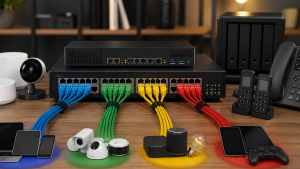
Switching decides how devices communicate inside the local network. VLANs let you separate traffic into logical groups, such as management, users, guest WiFi, cameras, servers, payment devices, and customer access. VLANs are not magic security by themselves, but they are the foundation for cleaner firewall rules and easier troubleshooting.
IP Addressing
Every network needs an addressing plan. Random subnets are tolerable in a tiny network, but they become painful when you add VPNs, multiple sites, ISP customers, cameras, containers, or lab services. Good addressing makes routing easier, reduces conflicts, and gives your documentation a structure.
Routing
Routing answers a simple question: where should traffic go next? Static routes are fine for small networks. Dynamic routing becomes useful when networks grow across sites, uplinks, towers, or routed segments. Even if you do not run OSPF or BGP today, understanding routing decisions makes you faster at solving outages.
DNS And DHCP
Check DNS and DHCP when a connected client cannot reach the service it needs. DHCP hands out addresses, gateways, and DNS servers. DNS turns names into destinations. If either is wrong, users will report "the internet is down" even when the link is fine. Include both services in the network diagram and troubleshooting checklist.
Wireless
WiFi is not just a password and an access point. Channel planning, transmit power, client density, interference, roaming, backhaul, antenna placement, and expectations all matter. A strong signal is not always a good connection, and more power is not always better.
A Practical Troubleshooting Flow
When a network problem appears, resist the urge to start changing settings immediately. A disciplined process saves time and prevents new problems.
- Define the symptom. Is it one device, one VLAN, one building, one app, one ISP link, or everyone?
- Check physical and power. Link lights, PoE, cable path, radio alignment, UPS status, and environmental issues.
- Confirm addressing. IP, subnet mask, gateway, DNS, DHCP lease, duplicate IPs, and route table.
- Test local before internet. Ping gateway, switch management, DNS server, then external IPs and names.
- Follow the path. Client to switch, switch to router, router to firewall, firewall to ISP, ISP to destination.
- Read logs and counters. Interface errors, drops, CPU, memory, DHCP logs, firewall denies, and wireless retries.
- Change one thing at a time. Document what changed and how you can undo it.
This simple flow applies to home networks, business networks, MikroTik routers, UniFi deployments, pfSense, Linux servers, and ISP gear. The tools change, but the discipline does not.
Use packet capture only after you have chosen the observation point. A capture on the client can prove that it sent a DNS query or TCP handshake, but it cannot prove the gateway received it. A capture on the gateway can show routing and firewall behavior, but not a damaged cable before the frame arrived. Record interface, direction, timestamp, client and destination addresses, and the narrow display filter used. Captures may contain credentials, names, cookies, payload data, and customer traffic, so collect the minimum interval, restrict access, and delete or retain it under an explicit policy.
Documentation Is Part Of The Network
A network that only exists in one person's memory is fragile. At minimum, every production network should have:
- A diagram showing routers, switches, access points, servers, uplinks, and important customer or business devices.
- An IP address plan with subnets, gateways, DHCP ranges, static assignments, and reserved ranges.
- A VLAN list with purpose, subnet, DHCP source, firewall policy, and where it is tagged or untagged.
- A credential and access process that does not depend on one browser profile or one forgotten password.
- A change log for firmware updates, firewall changes, wiring changes, and provider changes.
Good documentation does not have to be fancy. It has to be accurate enough that a tired person can use it during an outage.
Design Trust Before VLAN Numbers
A virtual local area network (VLAN) creates a Layer 2 boundary. A subnet creates an IP boundary. The firewall or routed policy between them determines what the separation protects. Do not create a VLAN only because a switch supports it. Create one when device ownership, data sensitivity, exposure, or administrative control changes.
A small environment can often start with trusted clients, guest devices, Internet of Things (IoT), and management or servers. Write the permitted flows in plain language before translating them into rules. For example, IoT devices may reach Domain Name System (DNS), Network Time Protocol (NTP), and a named controller, but not laptops or management interfaces. The exact rule syntax varies; the intent should not.
Read the homelab VLAN design guide when you are ready to turn that model into a firewall plan. Use the IoT isolation guide when multicast DNS, casting, printers, cameras, or Home Assistant must cross a boundary without opening every port.
Evidence to Capture Before a Change
A baseline makes troubleshooting comparative instead of speculative. Capture only what the job requires and protect exports because they can contain addresses, device names, usernames, shared secrets, wireless settings, and topology details.
- Client address, prefix, gateway, DNS servers, lease source, SSID or switch port, and timestamp.
- Relevant switch interface state, negotiated speed, errors, discards, VLAN assignment, and Power over Ethernet status.
- Gateway route, Address Resolution Protocol or neighbor entry, firewall decision, and Network Address Translation state when applicable.
- DNS query name, record type, resolver used, response, and whether browser encrypted DNS bypassed the local resolver.
- Configuration export, software version, current time source, and the exact previous values that rollback restores.
Change and Recovery Pattern
- Define one symptom and one acceptance test before changing anything.
- Save current configurations and confirm they can be read.
- Keep local console, out-of-band management, or a known-good access port available.
- Change the smallest responsible layer and record the time.
- Run positive, negative, and persistence tests. Include a reboot only when the change must survive one.
- Roll back when the acceptance test fails or an unrelated critical path regresses. Do not stack another speculative change on top.
Recovery planning is especially important for DNS, DHCP, firewall, remote-access, and management-VLAN changes. A configuration backup is useful only when the operator knows how to reach the device and restore it. For offsite administration, start with the WireGuard remote-access guide instead of publishing device administration pages.
Choose the Next Guide
Use the linked VLAN design guide to plan trust groups and firewall rules. Continue to IoT isolation when discovery-dependent devices need to cross those boundaries, or to WireGuard when the immediate problem is private remote administration. For a current outage, work through the troubleshooting flow above before redesigning the network.
Quick Starting Checklist
- Map your current network.
- Write down every subnet, VLAN, gateway, and DHCP scope.
- Identify the devices that should be isolated.
- Confirm you have backups of router, firewall, and switch configurations.
- Pick one monitoring tool and start collecting uptime, latency, and interface errors.
- Create a simple change log before the next change, not after the next outage.
That is where strong networking starts: clear purpose, clean structure, reliable documentation, and a repeatable troubleshooting process.
What This Page Does Not Prove
This is a documentation-backed operating model, not a report of measurements from one lab or vendor platform. It does not prove wireless capacity, convergence time, firewall throughput, roaming behavior, or application performance in your environment. Those outcomes depend on topology, versions, configuration, clients, interference, workload, and failure conditions. Define and record those tests before using a design as a production standard.
Related TechGeeks resources
- Homelab VLAN design and network segmentation turns trust groups into subnets and firewall intent.
- IoT isolation with VLANs, firewall rules, and mDNS handles discovery-dependent household services.
- WireGuard VPN for secure homelab remote access keeps administration off the public web.
17 thoughts on “Networking Field Notes: Start Here”