Guest Wi-Fi vs IoT VLAN: Isolation Without Breaking Everything
 Tech Guru
Quick Answer
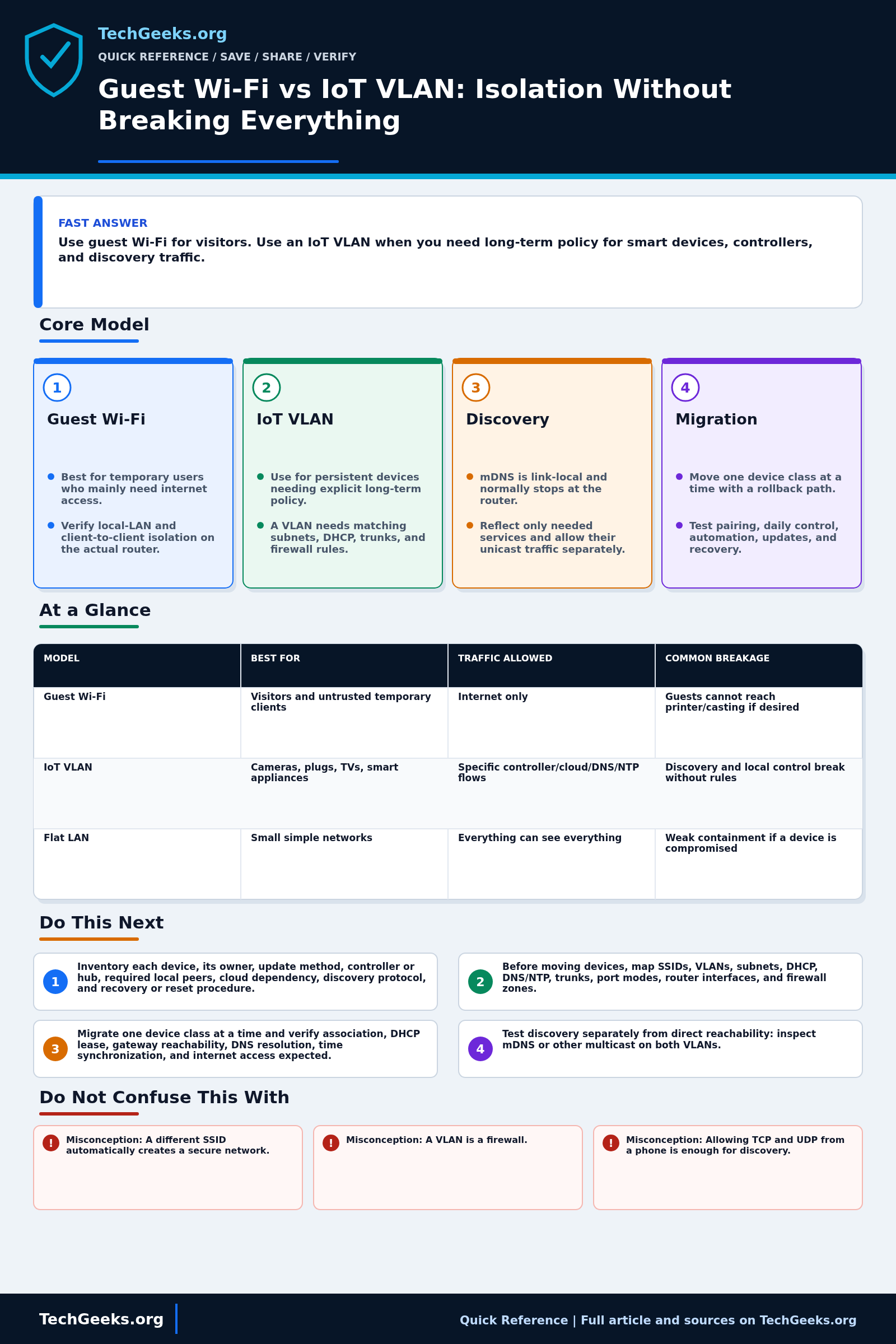
Use guest Wi-Fi for visitors who normally need internet access only. Use an IoT VLAN when devices need long-term, explicit rules for controllers, discovery, updates, and cloud services. Neither label proves isolation. Test IPv4 and IPv6 paths, migrate one device class at a time, and keep a known-good port or SSID for rollback. Matter support needs particular care.
Start Here: The Beginner Foundation
A guest Wi-Fi feature is usually a ready-made policy for temporary users: give them internet access while limiting access to the private LAN and, often, to one another. The exact behavior is a product choice, not a universal standard. Some routers place guests in a separate subnet and firewall zone, while others provide only wireless client isolation or use different rules on different radios. Test the feature before trusting the label, especially if guests should be able to reach a printer, display, or casting receiver.
An IoT VLAN is a long-lived network segment for devices such as cameras, plugs, televisions, appliances, and hubs. The VLAN separates Ethernet frames at Layer 2, while a router or firewall controls traffic between the IoT subnet, trusted clients, management systems, and the internet. Creating VLAN 30 does not by itself make devices safer: the AP, switch trunks, access ports, DHCP service, IP subnet, DNS, and firewall rules all need to agree. The security benefit comes from explicit, tested policy and smaller trust boundaries, not from the VLAN number.
Smart-home control is harder than guest access because discovery protocols are often local to one link. Multicast DNS, used by many discovery systems, is link-local by design; other products may use SSDP, broadcasts, vendor clouds, or direct unicast connections. A phone on the trusted VLAN may therefore fail to find a device on the IoT VLAN even when a firewall rule permits the final TCP or UDP session. Deliberate mDNS gateway or reflector scope, controller placement, and narrow firewall rules can restore required functions, but each device workflow should be tested from pairing through normal use and firmware update.
The Fast Comparison
| Model | Best for | Traffic allowed | Common breakage |
|---|---|---|---|
| Guest Wi-Fi | Visitors and untrusted temporary clients | Internet only | Guests cannot reach printer/casting if desired |
| IoT VLAN | Cameras, plugs, TVs, smart appliances | Specific controller/cloud/DNS/NTP flows | Discovery and local control break without rules |
| Flat LAN | Small simple networks | Everything can see everything | Weak containment if a device is compromised |
Advanced Notes and Design Boundaries
Segmentation is an enforced traffic policy, not an SSID name or VLAN ID. The design must describe which identities may initiate which IPv4, IPv6, multicast, broadcast, DNS, time, update, and management flows across every AP, switch, router, and controller in the path.
- Map SSID-to-VLAN assignment through the entire path. Tagged AP uplinks, switch allowed-VLAN lists, native or untagged VLAN expectations, router subinterfaces, and DHCP scopes must match; a PVID mismatch can look like an authentication or DHCP failure.
- Start with stateful directionality: permit trusted controllers to initiate only the required sessions toward IoT, allow established return traffic, and separately define IoT egress for DHCP, DNS, NTP, updates, and necessary cloud services. Review logs before narrowing further.
- mDNS uses link-local multicast and normally does not cross a router. An mDNS gateway or reflector should be scoped by interface and service type where the platform permits; reflecting advertisements does not automatically permit the advertised service through the firewall.
- Wireless client isolation and VLAN isolation solve different paths. Client isolation may block peers associated with the same SSID and AP, while inter-VLAN ACLs control routed traffic; verify wired devices and clients on different APs as well as same-radio peers.
- Apply equivalent intent to IPv4 and IPv6. Matter and many modern platforms use IPv6, so blocking or ignoring router advertisements, neighbor discovery, multicast, or IPv6 firewall policy can create a bypass or break operation even when IPv4 rules look correct.
Troubleshooting Workflow
Move devices by function and preserve a known-good control path. A broad temporary allow rule can help isolate a firewall problem, but it should be time-limited, logged, narrowed from observed requirements, and removed before the migration is accepted.
- Inventory each device, its owner, update method, controller or hub, required local peers, cloud dependency, discovery protocol, and recovery or reset procedure.
- Diagram SSIDs, VLAN IDs, subnets, DHCP scopes, DNS and NTP services, AP trunks, switch port modes, router interfaces, and firewall zones before moving any device.
- Migrate one device class at a time and verify association, DHCP lease, gateway reachability, DNS resolution, time synchronization, and internet access expected by policy.
- Test discovery separately from direct reachability: inspect mDNS or other multicast on both VLANs, then connect directly to the device IP and service port where the application allows it.
- Reproduce pairing, local control, automation, casting or printing, cloud control, firmware update, and controller recovery while watching firewall, DHCP, DNS, and mDNS-gateway logs.
- Remove temporary broad rules, document every retained exception with source, destination, protocol, port, and purpose, then retest after a lease renewal and device reboot.
Evidence and Acceptance Checks
The protocol behavior and risk model are documentation-backed by IEEE VLAN material, RFCs for multicast DNS and discovery proxying, and NIST consumer-IoT guidance. TechGeeks did not configure a representative router, switch, AP, Matter fabric, casting endpoint, or Home Assistant installation for this draft. No brand's guest toggle, reflector behavior, firewall syntax, or throughput was independently lab-tested.
- Isolation acceptance: an IoT or guest test client cannot initiate access to protected trusted and management addresses except through explicitly approved narrow rules, over either IPv4 or IPv6, including from wired paths and another AP.
- Service acceptance: association, DHCP, DNS, time, required updates, and intended cloud or local control survive reboot, lease renewal, and an AP handoff where relevant.
- Discovery acceptance: only approved service types cross the selected interfaces, and the advertised unicast service is separately permitted by a narrow firewall rule.
- Recovery acceptance: the documented fallback SSID or access port restores control, and saved configuration can be reapplied without factory-resetting every endpoint.
Security, Privacy, Legal, and Recovery Boundaries
Segmentation reduces reachable attack paths but does not patch vulnerable devices, secure vendor accounts, or inspect hostile encrypted traffic. DHCP, DNS, firewall, and discovery logs can reveal occupancy, device identity, destinations, and routines; retain only what is operationally justified and restrict access. Configure only networks you own or are authorized to administer. Employee, tenant, guest-notice, monitoring, and content-interception obligations vary by jurisdiction, so do not treat a home-lab packet capture as permission for workplace surveillance.
Export router, switch, and AP configuration before changing trunks, native VLANs, DHCP, IPv6, or firewall policy. Keep local access to the gateway and one known-good port or SSID outside the migration. Roll back the device class and its rules together; avoid factory resets until credentials, pairing codes, automations, camera retention, and controller backups are protected.
What This Does Not Mean
- Misconception: A different SSID automatically creates a secure network. Correction: An SSID is a wireless network name; meaningful isolation requires client isolation, VLANs or subnets, and enforced forwarding policy.
- Misconception: A VLAN is a firewall. Correction: A VLAN separates Layer 2 broadcast domains, but traffic between VLANs is controlled by the router, firewall, or Layer 3 switch policy.
- Misconception: Allowing TCP and UDP from a phone is enough for discovery. Correction: Many apps first depend on link-local multicast or broadcast discovery, which needs an explicit cross-subnet design before the unicast session begins.
- Misconception: Blocking all IoT internet access is always harmless. Correction: Some devices require cloud authentication, time, updates, notifications, or relays; determine and log required flows rather than assuming a universal policy.
The standards prove how VLAN and mDNS mechanisms are defined, not how a particular consumer router implements a guest feature or whether one rule set contains a compromised device. A successful phone-control test does not validate camera isolation, IPv6 parity, firmware updates, or every AP path. NIST guidance supplies outcome goals rather than vendor-specific configuration commands; acceptance requires tests on the deployed topology.
Real-World Use Cases
- Start with a simple guest network for visitors.
- Move IoT gradually, one device class at a time.
- Place Home Assistant and hubs intentionally.
- Allow only the flows required for local control.
Failure Patterns to Recognize
- Chromecast/AirPlay/printers fail across VLANs.
- Phone app cannot discover IoT device.
- Cloud-only device needs blocked outbound access.
- Thread/Matter border routers sit on the wrong network.
Common Mistakes
- Creating an IoT VLAN without firewall rules.
- Blocking all local traffic and expecting discovery to work.
- Moving everything at once.
- Forgetting DNS, NTP, and firmware update paths.
Quick Checklist
- Document device class and controller.
- Test pairing and daily automation.
- Check DNS/NTP/cloud endpoints.
- Review firewall logs.
- Keep a rollback port/SSID.
Common Questions
Useful Gear And Buyer Notes
Affiliate disclosure: As an Amazon Associate, TechGeeks may earn from qualifying purchases. The product links below are buying references, not a requirement to buy a specific brand or seller. Verify compatibility, seller quality, warranty, and current specs before ordering.
Confirm capabilities across the entire path before buying network hardware. A router that exposes VLANs may still lack per-zone IPv6 policy or scoped mDNS, and a managed switch or AP may require a separate controller or subscription; read current manuals for the exact model and firmware.
- Amazon search: VLAN capable router
- Amazon search: managed switch VLAN
- Amazon search: Home Assistant Green
Related TechGeeks Reading
- Smart Home VLAN vs Guest Wi-Fi vs a Second SSID expands the household decision.
- IoT Isolation in a Home Lab goes deeper into firewall and mDNS design.
- Beginner VLAN Layout for a Home Lab provides a broader segmentation starting point.
Verify Your Router's Actual Policy
Guest-network behavior is product-specific. Check the exact router and AP firmware for wired and wireless isolation, IPv4 and IPv6 rules, discovery scope, and recovery access. A successful phone-control test is not evidence that camera isolation, Matter commissioning, updates, and every AP path work.
References
- Home Assistant Documentation
- Connectivity Standards Alliance: Matter
- IEEE 802.1Q-2022 Bridges and VLANs Standard
- RFC 6762: Multicast DNS
- RFC 6763: DNS-Based Service Discovery
- RFC 8766: Discovery Proxy for Multicast DNS-Based Service Discovery
- RFC 8882: DNS-SD Privacy and Security Requirements
- NIST IR 8425: Consumer IoT Cybersecurity Profile
- NIST IR 8228: Managing IoT Cybersecurity and Privacy Risks